MyPeopleDoc is a digital HR safe that centralizes and secures professional documents (pay slips, contracts). Intended for employees and companies, it digitizes procedures, archives files with legal value, and offers tools such as electronic signature or secure sharing. With a personal space, users retain their data after changing employers. Secure (encryption, GDPR) and free for employees, it optimizes HR management and allows 24/7 access to documents from all devices. An ecological and modern solution to simplify professional processes.
Are you tired of searching for your pay slips or certificates amid email clutter and paperwork? MyPeopleDoc simplifies this time-consuming management by centralizing your HR documents in a secure digital safe accessible 24/7. Integrated into the UKG ecosystem, the platform allows companies to digitize their processes and offers employees a personal 10 GB space to store, sign, or share files via computer, smartphone, or tablet. GDPR compliant, it guarantees the longevity of your data for up to 50 years, even after changing employers.
Somaire
What is MyPeopleDoc? The complete guide to understanding everything
Definition: much more than just a storage space
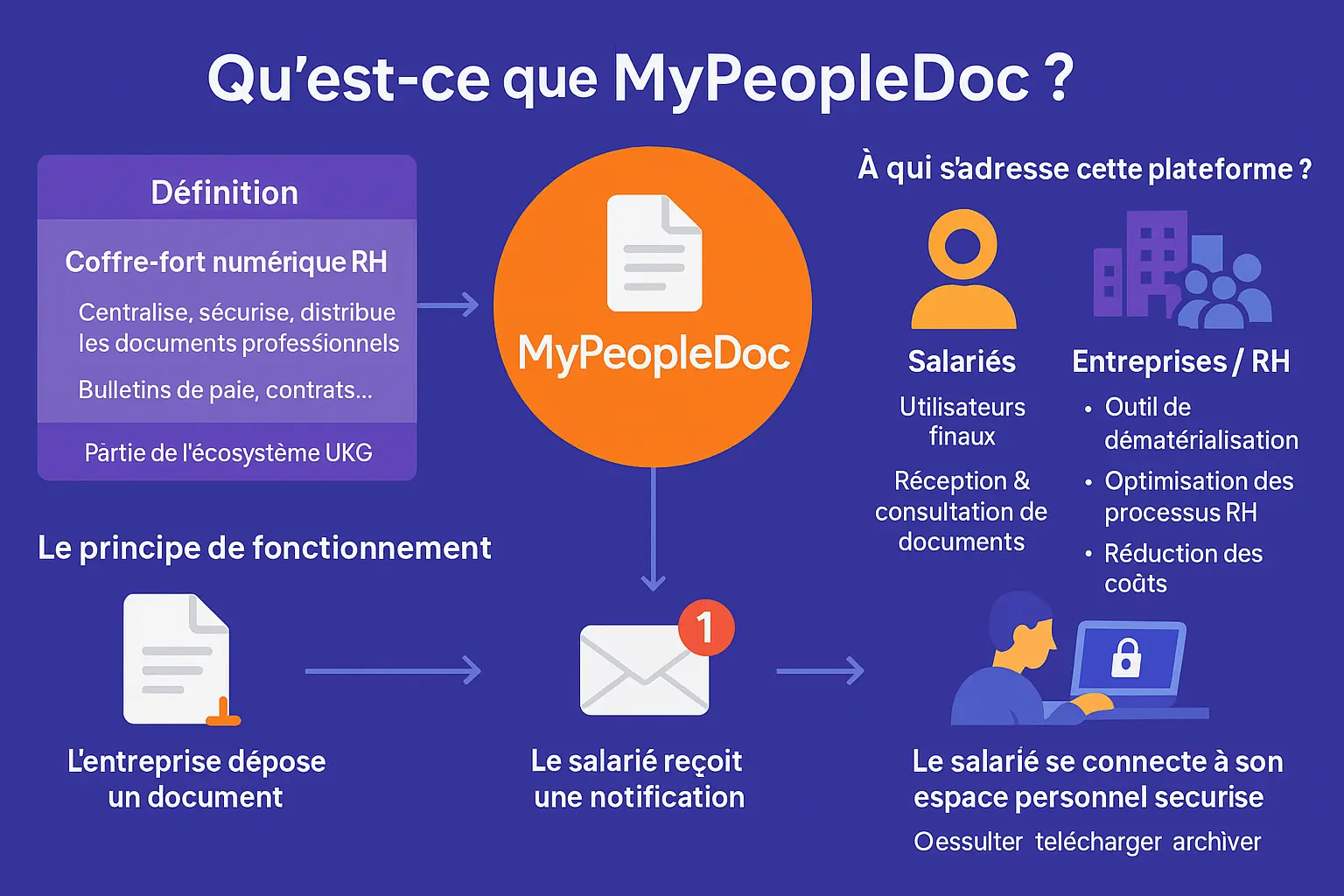
MyPeopleDoc is a digital HR safe integrated into the UKG ecosystem. Centralizing, securing, and automating the management of professional documents (contracts, pay slips), it goes beyond simple storage by offering a structured digital solution for companies and their employees, with compliance to GDPR standards.
Who is this platform for?
Intended for companies (SMEs, large groups) and their employees, the platform optimizes two uses: for companies, it reduces costs and administrative tasks; for employees, it offers a secure and accessible 24/7 space to consult, download, or archive their HR documents.
How it works in a few words
The process is simple: 1. The company uploads a document (e.g., an amendment). 2. The employee receives a notification. 3. They access their secure space to download the document. The personal space remains permanent, independent of the employer, even in case of departure.
MyPeopleDoc modernizes HR management by combining automation and security. For companies, it reduces the time dedicated to administrative tasks by 70% through alerts for key dates and electronic signatures. For employees, it simplifies access to their documentation and strengthens their autonomy.
- Centralization: HR documents (contracts, training) gathered in one place.
- Security: Secure cloud storage compliant with GDPR.
- Automation: Alerts for deadlines and simplified processes (legal signatures, online approvals).
- Collaboration: Integrated messaging and interactive calendar to streamline HR-employee exchanges.
To meet the modern challenges of the employee experience, MyPeopleDoc simplifies HR management, strengthens talent retention, and improves the efficiency of HR teams while ensuring user satisfaction.
Key features of MyPeopleDoc at the service of your career
MyPeopleDoc transforms administrative management by centralizing your essential documents. No more bulky files: each employee accesses a secure digital safe, available for life, even after changing companies. Discover how this solution simplifies your procedures.
The digitization of your HR documents
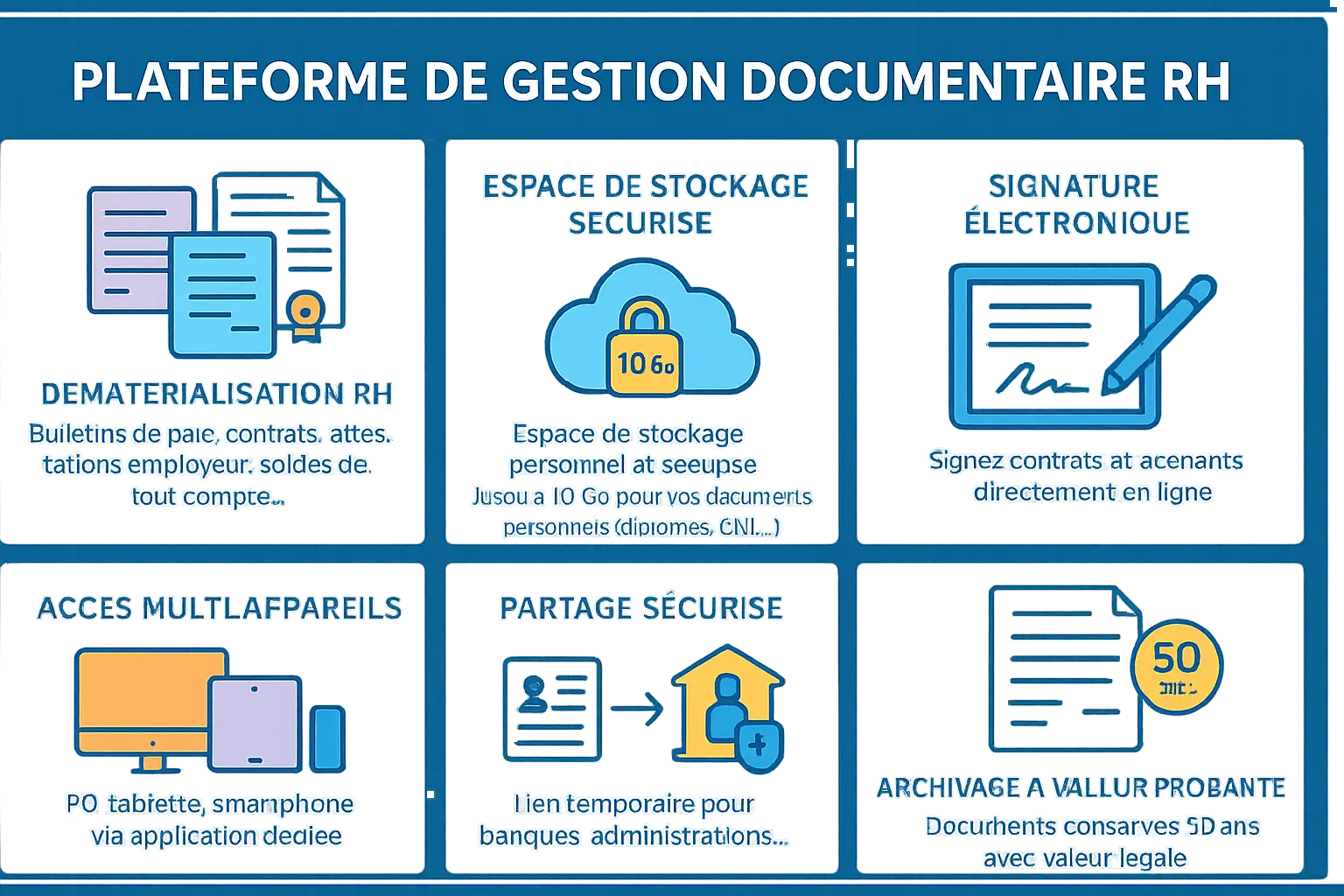
MyPeopleDoc eliminates paperwork by hosting your HR documents: pay slips, employment contracts, amendments, employer certificates, or final settlements. No need to search through piles of paper: each file is instantly accessible, anytime. This digital approach reduces the risk of loss and guarantees optimal preservation, even in the long term. In case of administrative procedures, such as a bank loan or retirement application, your supporting documents are ready with one click.
A personal and secure storage space
Each account offers up to 10 GB of space, turning MyPeopleDoc into a true personal cloud. You are not limited to documents sent by your company: add diplomas, identity cards, or other important documents. Access is protected by personal credentials, and data remains available even after you leave the company. This long-term storage preserves your administrative archives without physical constraints, while complying with legal retention standards.
Practical tools to simplify your procedures
MyPeopleDoc’s features go beyond simple storage. Here’s what makes the platform indispensable:
- Electronic signature: Approve contracts or amendments without printing, manually signing, or scanning. Everything is done in a few clicks.
- Multi-device access: Log in from your computer, smartphone, or tablet thanks to the dedicated app. Work on the go or from home.
- Secure sharing: Generate temporary links to send a document to a bank or administration without compromising security.
- Legally valid archiving: Electronic pay slips have the same legal value as paper versions, kept for 50 years. An invaluable guarantee for your future needs.
Your MyPeopleDoc account: access guide and proactive management
How to activate your account for the first time?
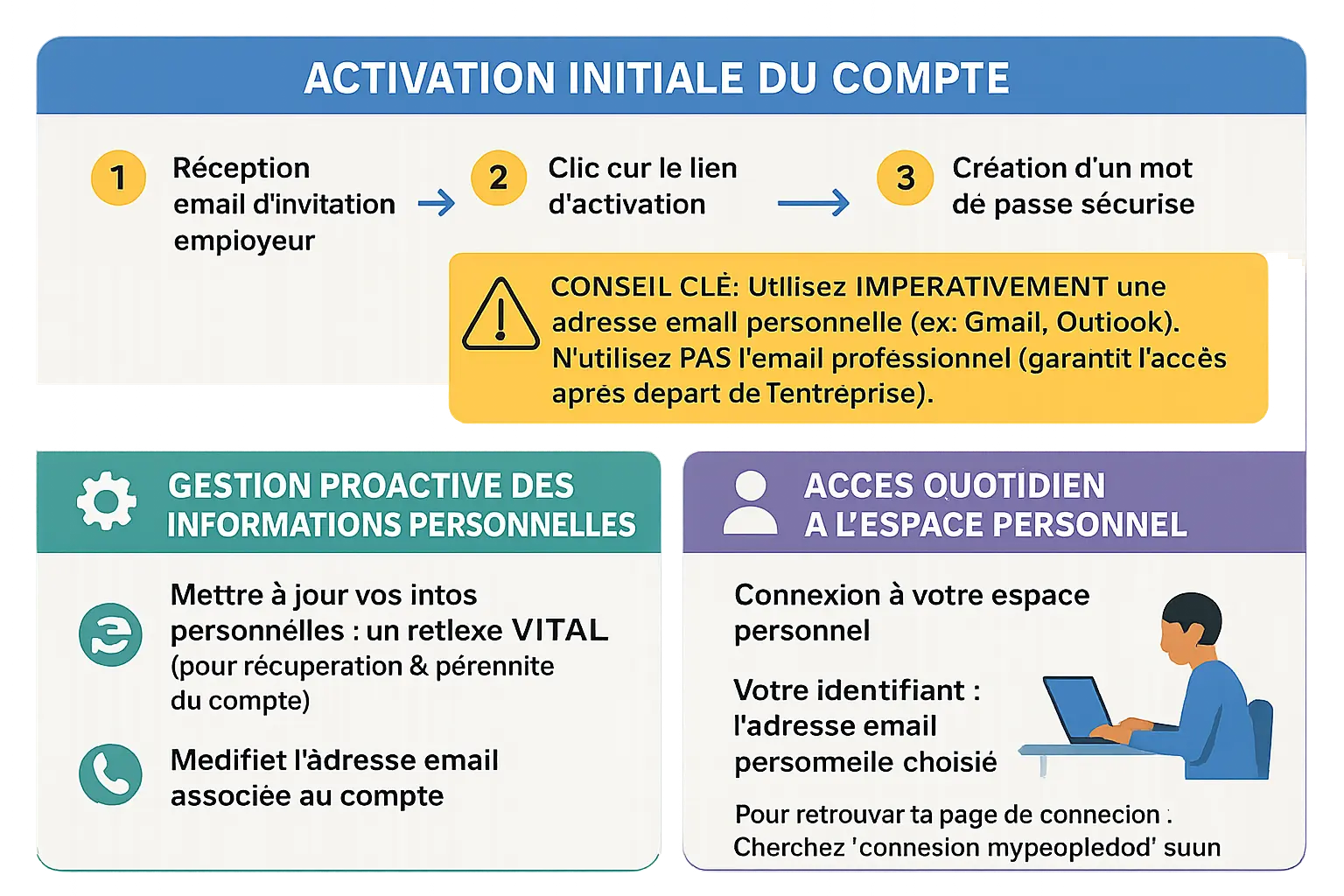
The process begins with receiving an invitation email from your employer. This message contains a link to click within 48 hours. Then create a strong password, combining uppercase, lowercase, numbers, and special characters (example: Password2025!), to secure your access.
Always use a personal address (Gmail, Outlook, etc.), never a professional one. This ensures permanent access, even after leaving a company. For example, if your professional address is deactivated, you retain access to your contracts or work certificates without additional steps.
Manage and update your personal information: the reflex to adopt
Keeping your data up to date is essential: this allows you to recover your account in case of a forgotten password or to receive alerts about new available documents. To change your email or phone number, go to the “Personal Information” tab in your profile, then validate the changes via an SMS or email code.
Neglect can block access to your documents in an emergency. For example, an outdated number delays recovery while traveling. To avoid this, check your contact details every quarter, especially if you change your phone or email address.
Logging into your personal space: simple steps
Your username is the personal email chosen at activation, associated with your password. To find the login page, type “connexion mypeopledoc” into Google. The official link appears at the top of the results. If in doubt, bookmark this page at your first login to avoid detours.
If forgotten, the reset is done via a verification code. This code expires in 15 minutes: act quickly or request it again. Make sure your contact details are active to receive this code without delay.
MyPeopleDoc simplifies administrative management but requires rigorous handling from activation. By following these steps, you control your space at all times, without depending on a third party. A turnkey solution for stress-free document management.
Connection problems? Solutions to never lose access
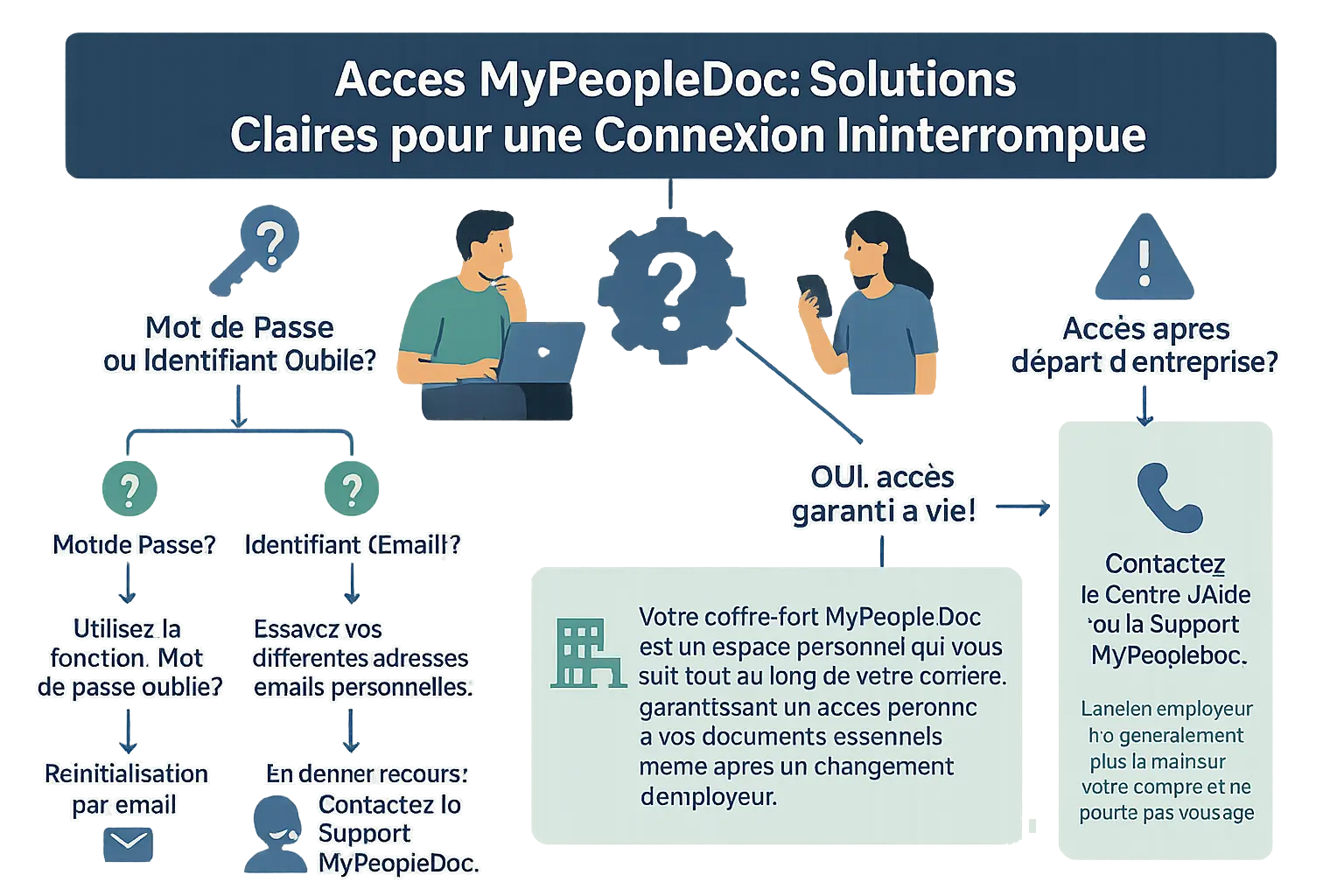
Why waste time in front of a locked screen when your HR documents are accessible in a few clicks? MyPeopleDoc secures your HR and personal files. Here is how to solve common blockages while optimizing access to your digital safe.
Forgot password or username: what to do?
To reset your password, click on “Forgot password?” and check your email inbox. If the link does not arrive, check your spam folder or resend the request. The username corresponds to the email used at activation. Try your usual personal addresses.
If unsuccessful, contact MyPeopleDoc technical support. They are your main recourse for recurring problems. Keep a copy of your credentials on a secure medium to avoid blockages. For complex passwords, use a password manager to simplify the task.
I left my company, can I still access my documents?
Your MyPeopleDoc safe is a personal space that follows you throughout your career, guaranteeing permanent access to your essential documents even after changing employers.
Your account remains active thanks to your personal email. You keep your HR documents for 50 years (in France) and your personal files up to 10 GB. Termination of an employment contract does not delete your data. In case of professional mobility, you can even transfer your personal files to a new account if necessary.
Who to contact in case of persistent problems?
For technical difficulties, the MyPeopleDoc help center offers guides for 80% of common problems. Use thematic filters to find quick solutions. Technical support is available 7 days a week via online forms.
Describe the error precisely to speed up processing. Avoid calling your former employer, who no longer manages your account. In case of repeated forgetfulness, activate your browser’s reminders to securely save your login details.
| Type of problem | Immediate solution | Secondary recourse |
|---|---|---|
| Forgotten password | Email reset | Contact technical support |
| Lost username | Check old emails | Procedure with former employer |
| Technical error | Consult the help center | Detailed contact form |
In summary, MyPeopleDoc remains accessible for life thanks to your personal email. Good management of login details and regular consultation of documents ensure smooth access. In case of doubt, the help center remains a valuable ally to resolve technical blockages 9 times out of 10.
Security and compliance: are your data really secure?
Choosing an HR document management platform involves asking essential questions about data security. MyPeopleDoc addresses these concerns by combining legal compliance and robust technical measures. But how does this digital safe actually work?
Compliance with the GDPR and French legislation
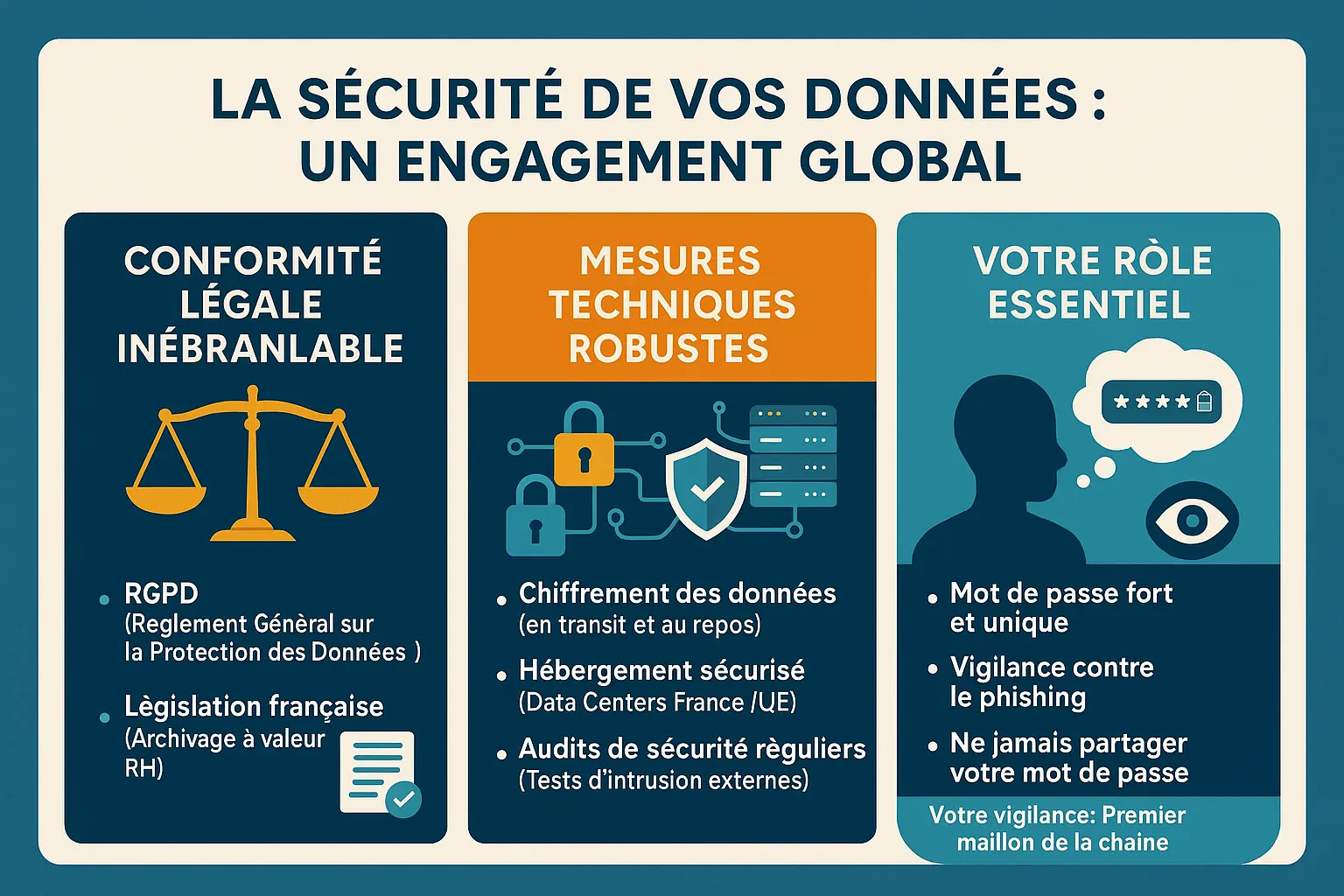
MyPeopleDoc is designed to meet GDPR requirements, ensuring secure management of personal data. Companies can therefore store HR documents such as employment contracts or pay slips with complete peace of mind. The solution also complies with French standards for probative value archiving, crucial for dematerialized HR documents.
In case of inspection or dispute, the documents stored on the platform have legal value. This avoids risks related to the loss of supporting documents or poor management of physical archives.
Technical security measures to protect your information
- Data encryption: Documents are encrypted during transfer and storage, making them unreadable without the decryption key.
- Secure hosting: Servers, located in France or within the European Union, comply with GDPR requirements.
- Regular security audits: External experts regularly test the platform to identify and fix vulnerabilities.
Your role in the security of your account
While the platform ensures technical protection, the user also plays a key role. A complex password, enabled two-factor authentication, and vigilance against phishing attempts strengthen overall security.
“The security of your documents relies on cutting-edge technology, but also on good practices. Your vigilance is the first link in the chain protecting your personal space.”
Advantages, business model, and alternatives to MyPeopleDoc
MyPeopleDoc meets the needs of companies wishing to simplify HR document management. How does it position itself against competitors? Analysis of its business model and benefits.
Who pays for the MyPeopleDoc service?
The B2B model is clear: only the company bears the cost. Employees benefit from free access to their HR documents via an invitation link. This system guarantees easy adoption, with no additional costs for employees.
Alternatives on the digital safe market
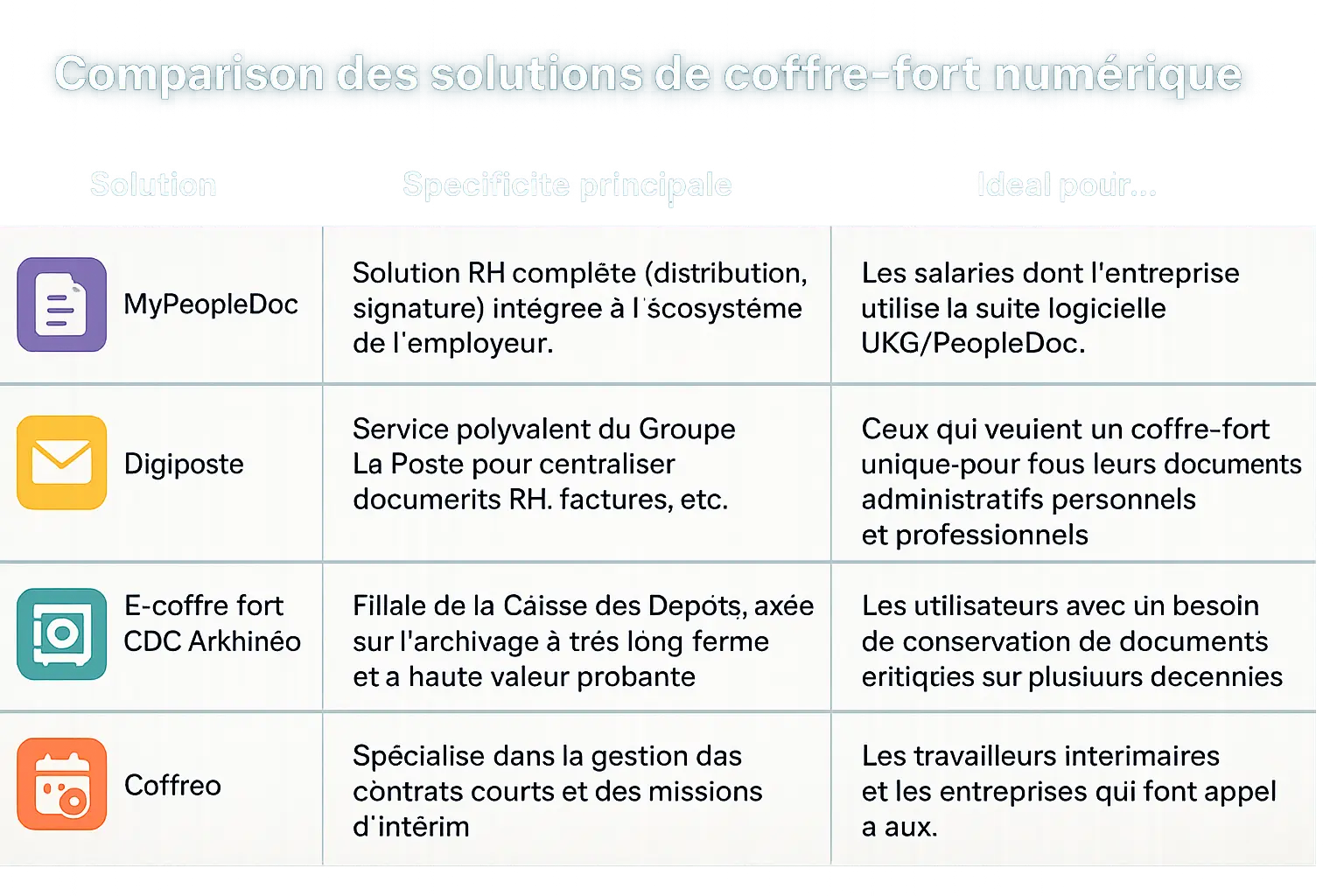
| Solution | Main feature | Ideal for… |
|---|---|---|
| MyPeopleDoc | Complete HR solution (distribution, signature) integrated into the employer’s ecosystem. | Employees whose company uses the UKG/PeopleDoc software suite. |
| Digiposte | Versatile service from Groupe La Poste to centralize HR documents, invoices, etc. | Those who want a single safe for all their personal and professional administrative documents. |
| E-coffre fort CDC Arkhinéo | Subsidiary of the Caisse des Dépôts, focused on very long-term archiving with high probative value. | Users needing to preserve critical documents over several decades. |
| Coffreo | Specialized in managing short-term contracts and temporary assignments. | Temporary workers and the companies that hire them. |
Faced with this competitive landscape, MyPeopleDoc stands out by its direct HR integration. No need to create an external account: access is through the employer, for a smooth and secure experience.
In summary: the benefits for you and your company
The advantages are twofold: time savings and enhanced security. Employees have 24/7 access to their files, with advanced encryption. Companies reduce administrative tasks and ensure GDPR compliance. Up to 10 GB of space per user allows the solution to be tailored to the needs of each organization.
MyPeopleDoc embodies the digital transformation of human resources, offering secure and simplified access to your essential documents. Thanks to its long-term storage, intuitive tools, and legal compliance, it combines convenience for employees and efficiency for companies. A key solution to modernize administrative management, while preserving the security of your sensitive data.
FAQ
What is MyPeopleDoc and how does it work?
MyPeopleDoc is a secure digital HR safe that allows employees to store, view, and manage their professional documents. It centralizes pay slips, employment contracts, employer certificates, and other HR files, accessible at any time via a personal space. Regarding its operation, the company uploads the documents to the platform, the employee receives a notification by email, then logs into their account to access them.
Who is MyPeopleDoc designed for?
MyPeopleDoc is mainly intended for two parties: employees, who benefit from simplified and secure access to their HR documents, and companies, which use it to automate the distribution of these same documents. It thus meets the needs of HR teams wishing to modernize their processes while leaving individuals in control of their personal data.
How to activate and access your MyPeopleDoc account?
Account activation is done in a few steps. After receiving an invitation email from the employer, simply click on the activation link, then create a secure password. For practical and long-term reasons, it is crucial to use a personal email address (such as Gmail or Outlook) rather than a professional email. In case of changing companies, this choice guarantees continuous access to your documents.
Is document security guaranteed on MyPeopleDoc?
Yes, security is a fundamental pillar of the platform. MyPeopleDoc complies with GDPR and is certified ISO/IEC 27001:2013, ensuring data encryption in transit and at rest. Servers are hosted in the European Union, and regular audits are conducted to maintain a high level of protection. Furthermore, the user plays an active role by adopting strong passwords and avoiding sharing their credentials.
What types of documents can be stored in MyPeopleDoc?
The personal space offers up to 10 GB of storage, sufficient to archive all your essential HR documents: employment contracts, pay slips, amendments, final account statements, attendance sheets, as well as diplomas and identity cards. Accepted formats include PDF, images (JPEG, PNG, GIF), and text documents (DOC, DOCX). There is another way to manage your administrative archives, but MyPeopleDoc combines convenience and security for simplified daily use.
