

| Key Points | Details to Remember |
|---|---|
| 🔍 Definition | Juriv’IA is an AI platform specialized in law to refine your searches. |
| ⚙️ Installation | Simple installation steps via interface or WordPress integration. |
| 🔧 Configuration | Customize filters, sources, and relevance levels. |
| 🚀 Optimization | Refine your queries using Boolean operators and advanced criteria. |
| 📈 Performance | Measure the quality of responses via integrated indicators. |
| 🔗 Integrations | Connect Juriv’IA to your internal databases or CRM. |
| 💡 Tips | Leverage predefined models and saved queries. |
With this tutorial, you will configure and optimize Juriv’IA in a few minutes to conduct more precise legal research and save valuable time. You will discover the essential settings and best practices to get the most out of this specialized AI assistant.
Somaire
1. Understanding the Juriv’IA Environment
Before diving into the configuration, it is essential to grasp the overall functioning of Juriv’IA. This platform combines a semantic engine, advanced filters, and a rich document database to provide ultra-relevant results. Each query goes through an algorithm that analyzes the legal context and ranks sources according to their reliability.
1.1 Key Architecture and Modules
- Semantic engine: interprets natural language and detects precise intent.
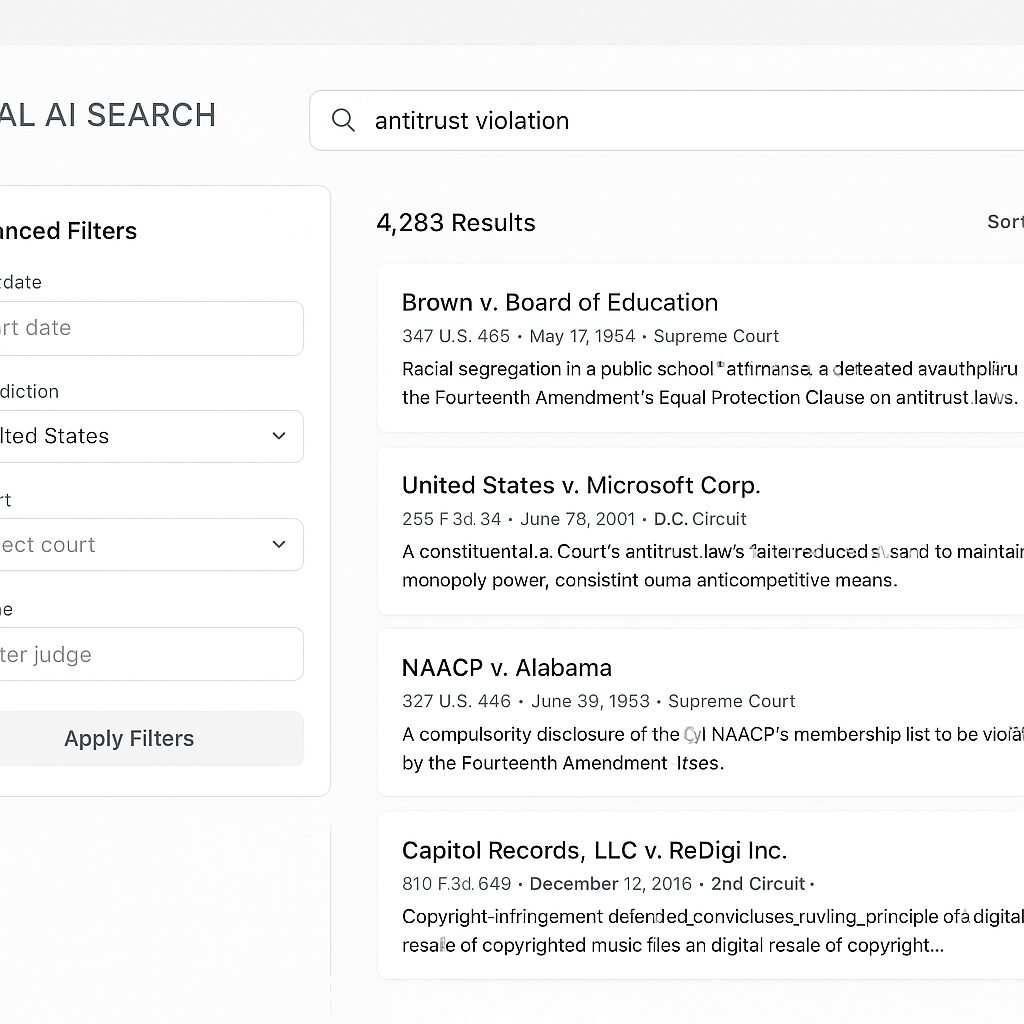
- Dynamic filtering: allows targeting court, date, document type.
- Connection API: integrates with your internal databases or legal portals.
1.2 Sources and Document Corpora
Juriv’IA provides access to more than 5 million texts (codes, case law, specialized journals). You can add private databases or RSS feeds from legal newsletters to enrich your working environment.
“The quality of legal research depends as much on the tool as on the selection of sources,” recalls Maître Dupont, lawyer at the Paris Bar.
2. Installing Juriv’IA on WordPress
Installation is done in three steps, directly from your WordPress back office or via a ZIP package.
2.1 Via the WordPress Plugin Interface
- Extensions Menu → Add New.
- Search for “Juriv’IA”. Click Install, then Activate.
- Then go to Settings → Juriv’IA for the initial setup.
2.2 Manual Installation (ZIP Package)
- Download the plugin ZIP file.
- Drop it into the
wp-content/pluginsfolder. - Activate it via your console or the Plugins tab.
Once activated, a new Juriv’IA menu appears. You can insert your API key provided during your subscription there.
3. Configure the basic settings
The first configuration consists of defining the scope and depth of your search.
3.1 API key setting and authentication
Paste your API key into the dedicated field. Enable token authentication to avoid frequent renewals. This way, you benefit from a secure and permanent connection.
3.2 Choice of documentary sources
Juriv’IA offers several levels of precision:
- Standard: access to public documentation (Official Journal, codes).
- Premium: annotated case law and specialized journals.
- Customized: integrate your own databases or feeds.
To add an internal corpus, drag and drop a CSV file or synchronize your DMS via the API.
3.3 Performance settings
Define the number of results per page (max. 50), the analysis depth (from 1 to 5 levels), and the timeout delay. These adjustments directly affect the speed and relevance of the responses.
4. Optimize your searches
To go further, use advanced operators and predefined query templates.
4.1 Boolean operators and advanced filters
- AND/OR/NOT: refine your keyword combinations.
- Proximity or NEAR: search for two terms in the same paragraph.
- Time filters: decision after 2015, specific dates.
- Document type: cassation ruling, order, doctrine.
4.2 Saved queries and alerts
Each complex query can be saved for later re-execution. Activate email alerts to receive new documents or updates matching your criteria.
4.3 Specialist tips
- Favor short syntaxes, then refine progressively.
- Test several depth levels to measure the impact on relevance.
- Combine time filters with proximity operators to find the most relevant recent rulings.
5. Additional integrations and automations
Juriv’IA can connect to your CRM, your drafting tools, or third-party databases.
5.1 Connection with a legal CRM
Synchronize your client files so that each query is automatically recorded in the corresponding profile. This way, you gain in traceability and documentary reliability.
5.2 Automation of contract drafting
Relying on a dedicated guide, you can generate standard contracts from standardized legal clauses. This feature connects in a few clicks and uses your firm’s internal templates to industrialize drafting while maintaining a high level of customization.
5.3 Comparison of features
To choose the right plan and options adapted to your practice, an overview of the most requested features will help you. You can analyze the differences between each module and optimize your subscriptions according to your real needs.
FAQ
What is Juriv’IA and who is it for?
Juriv’IA is an artificial intelligence platform dedicated to legal research. It is intended for lawyers, corporate legal professionals, students, and legal professionals who want to accelerate and ensure the reliability of their research.
How to install Juriv’IA on WordPress?
You can install Juriv’IA from the WordPress plugin interface or manually via a ZIP file. After activation, simply enter your API key in the dedicated menu.
What advanced filters are available?
Juriv’IA offers Boolean filters (AND, OR, NOT), proximity operators (NEAR), temporal criteria, and selection of document type (judgment, order, doctrine).
Can you integrate your own documents?
Yes, you can import CSV files, synchronize a document management system via API, or add RSS feeds to complement the standard document base.
How to optimize the relevance of the results?
Test different depth levels, combine Boolean operators with temporal filters, and save your queries to progressively refine accuracy.
