
| Key Points | Details to Remember |
|---|---|
| 📝 Service Definition | Bbox Mail offers personalized access reserved for Bouygues Telecom subscribers. |
| ⚙️ IMAP/POP Settings | IMAP synchronizes your folders across all your devices, while POP downloads messages locally. |
| 📥 IMAP vs POP | IMAP uses the secure port 993, POP relies on the encrypted port 995. |
| 🔒 Security and Ports | Enable SSL/TLS to ensure the confidentiality of your exchanges. |
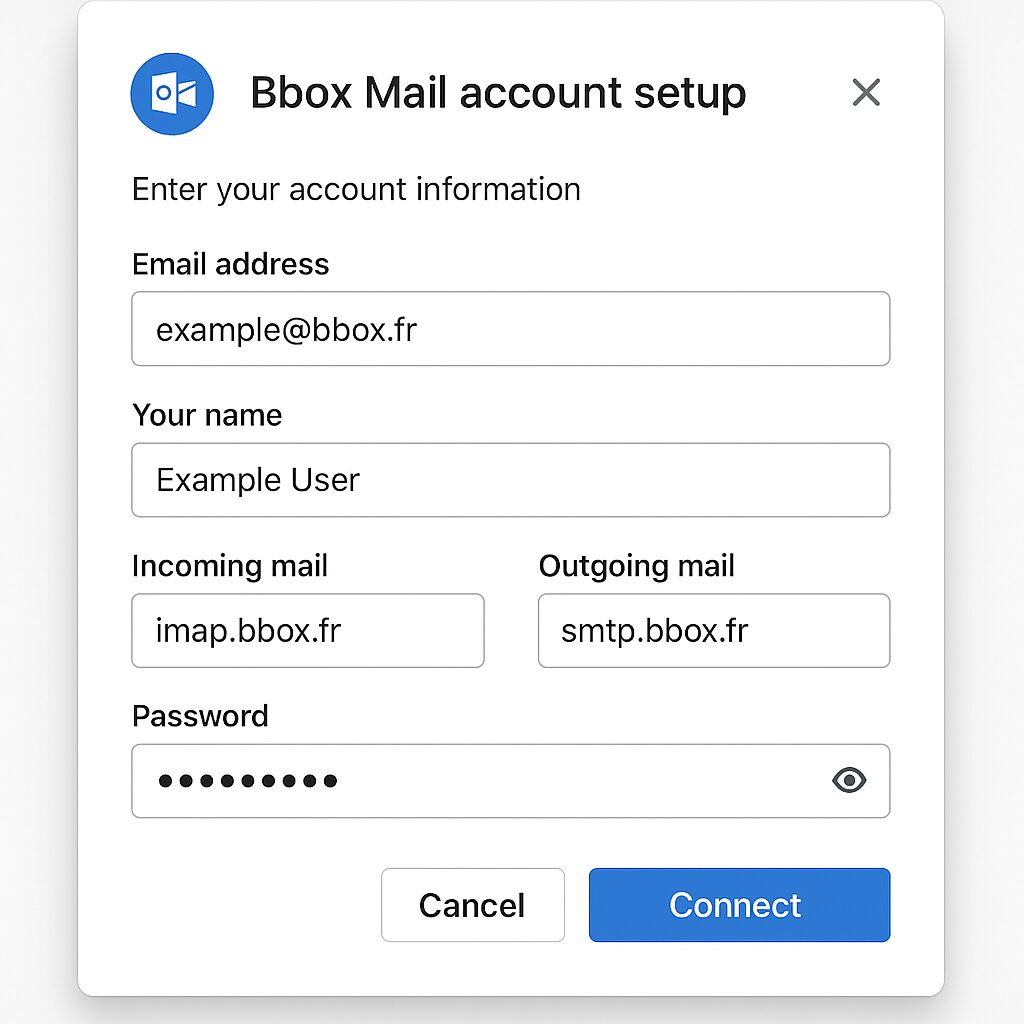
| 📧 Outlook | Integrate your Bbox Mail account via the setup wizard by specifying incoming and outgoing servers. |
| 📧 Gmail | Add your Bbox Mail from the “Accounts and Import” tab by choosing IMAP. |
This guide details step-by-step how to integrate your Bbox Mail with Outlook and Gmail. In just a few minutes, you will access your Bouygues Telecom emails from the application of your choice.
Somaire
Essential Prerequisites
Before starting, make sure you have:
- Your Bbox Mail address and associated password.
- An active Bouygues Telecom subscription.
- The latest version of Outlook (Windows or Mac) or an accessible Gmail account.
- A stable Internet connection to test the settings.
These elements ensure smooth setup and reliable synchronization.
Setting Up Bbox Mail on Outlook
Outlook allows centralized management of multiple accounts. Here’s how to add Bbox Mail via IMAP or POP.
Choosing Between IMAP and POP
IMAP keeps your messages on the server and synchronizes each action (reading, deletion) across all devices. POP3, older, downloads emails locally and can delete them from the server. We recommend IMAP to preserve your online history.
Connection Settings
| Server Type | Address | Port | SSL/TLS |
|---|---|---|---|
| Incoming Server (IMAP) | imap.bbox.fr | 993 | Yes |
| Incoming Server (POP3) | pop.bbox.fr | 995 | Yes |
| Outgoing Server (SMTP) | smtp.bbox.fr | 465 | Yes |
Step-by-Step Instructions
- Open Outlook and click File > Add Account.
- Select Manual setup then IMAP or POP.
- Enter your name, Bbox Mail address, and password.
- Specify the incoming and outgoing servers as detailed above.
- Enable the option My outgoing server requires authentication and re-enter your credentials.
- Click Test Account Settings to verify the connection.
- Confirm: your account now appears in Outlook.
Set up Bbox Mail on Gmail
Gmail allows you to import your external emails while continuing to send from your Bbox Mail address.
Access import settings
In Gmail, click on the gear icon, then See all settings. Open the Accounts and Import tab.
Detailed procedure
- Click on Add a mail account.
- Enter your Bbox Mail address, check Import emails from my other account (POP3) then Next.
- Provide:
- POP Server: pop.bbox.fr
- Port: 995 with SSL
- Username and password
- Enable the option to leave a copy of messages on the server if necessary.
- Choose a label to identify Bbox Mail messages in your Gmail inbox.
- Confirm, then decide if you want to be able to send emails from Gmail using your Bbox Mail address.
- If you check this option, then configure the SMTP server (smtp.bbox.fr, port 465, SSL/TLS).
Tip for security and performance
Always ensure that SSL/TLS is enabled on your clients. For advanced users facing network restrictions, a detailed guide explains how to use a rotating proxy to guarantee continuous and stable access.
Key points
- IMAP for multi-device synchronization, POP for local storage.
- Bbox servers: incoming imap.bbox.fr (993), pop.bbox.fr (995); outgoing smtp.bbox.fr (465).
- Enable SSL/TLS to protect your data.
- Manage import in Gmail from Accounts and Import.
- Always test the configuration before confirming.
FAQ
What is the difference between IMAP and POP for Bbox Mail?
IMAP synchronizes your messages across all your devices in real time, while POP downloads emails locally and can delete them from the server.
Which ports should be used for Bbox Mail?
For IMAP: port 993, for POP: port 995, for SMTP: port 465, all using SSL/TLS.
How to add Bbox Mail on Outlook?
In Outlook, go to File > Add Account, choose Manual IMAP/POP setup and enter the server settings and your credentials.
Can I send Bbox emails from Gmail?
Yes, in Gmail under Accounts and Import, add your Bbox Mail address and configure SMTP smtp.bbox.fr on port 465 with SSL.
How to ensure the security of my exchanges?
Always enable SSL/TLS in your mail clients and update your applications to benefit from security patches.
