
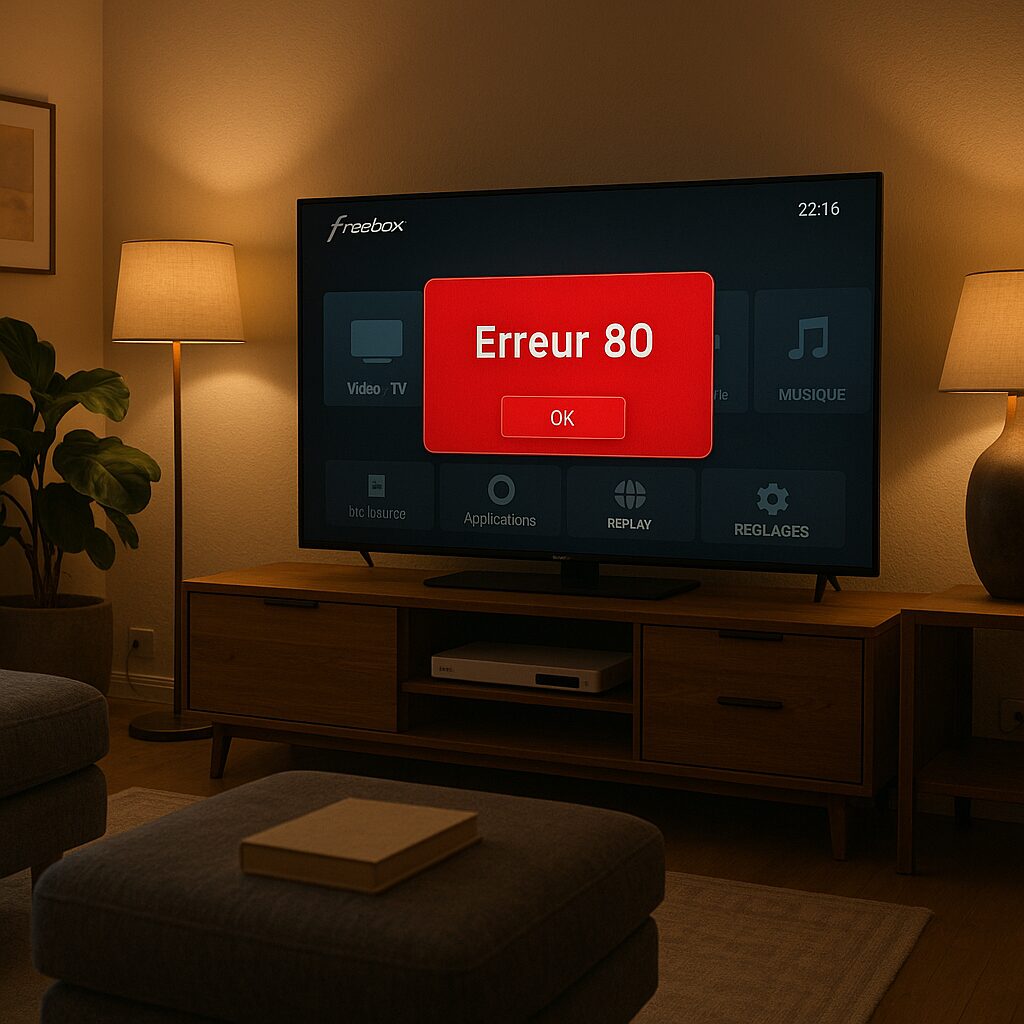
When your TV screen suddenly displays Error 80 and freezes the display, you quickly feel helpless facing this cryptic message. Rather than enduring the wait for support, this article aims to demystify the display, identify possible causes, and outline a simple repair protocol. Together, we trace the technical leads and share some tips to prevent this blockage in the future.
🔧 Error 80 blocks the TV display on Freebox, generally linked to a network issue or firmware.
⚡ A full restart and checking the local network often suffice to restore service within a few minutes.
🔍 In 70% of cases, an unfinished automatic update triggers this message: remember to keep the box up to date.
📞 If all maneuvers fail, contact support noting the error code and software version.
Somaire
Understanding error 80 on your Freebox TV
Facing Error 80 first requires understanding how the decoder interprets its internal problems. Rather than mixing an ambiguous code in the list of faults, Freebox sends this alert when a critical process — update, network initialization, or interaction with an external device — has failed.
In practice, the error occurs when the system tries to validate a boot or automated recovery cycle. If a component remains inaccessible, the TV interface freezes on this message, stopping all broadcast. Understanding this mechanism allows you to immediately direct your diagnosis to the relevant software or hardware areas.
Common causes
Several factors can trigger the famous code 80. It is not always a hardware failure: a simple home network conflict or an interrupted firmware will cause the Freebox to enter this forced standby state. Here are the most frequently identified cases:
| Element | Possible impact |
|---|---|
| Internet connection | Network timeout, service interruption |
| Firmware update | Temporary blocking at restart |
| USB device | Hardware conflict causing the error |
Another frequent culprit is simultaneous access to multiple HDMI or USB sources at the same time: the decoder may refuse the switch if priority is not clearly defined. Finally, the electrical connection to a faulty power strip can disrupt power during the critical startup moment, leading to Error 80.
Step-by-step solutions
Complete Equipment Restart
The first step resembles a classic “turn off/turn on” but with a nuance: unplug the Freebox from the outlet, wait two minutes to discharge any residual power, then plug it back in. This method forces a clean startup cycle, resets the RAM, and frees any suspended processes.
If the error persists, do not immediately proceed to the heavy option of resetting: note the firmware version displayed at the bottom of the error screen and begin network verification.
Network Verification
Error 80 often appears when the Freebox fails to reach the update or control server. Start by testing Internet access: open a browser on another device and load a reliable page. If the connection is unstable, restart your router or switch, and ensure that the Freebox is properly connected via Ethernet or Wi-Fi according to your setup.
According to official documentation, latency over 200 ms can be enough to interrupt the update cycle and trigger the error.
In case of dynamic IP, also check that the DHCP lease is active and not expired, as a blocked reassigned address can cause the same issue.
Resetting TV Settings
If the network is healthy and the restart ineffective, resetting the video output settings may help. In the decoder’s hidden menu (accessible via the remote by pressing certain buttons in sequence), you will find the option to restore factory values for HDMI, picture format, and resolution. This procedure fixes conflicts that occur when the TV suddenly switches between Full HD and 4K, for example.
Remember to save your preferences before making changes to avoid losing your HDMI-CEC or audio settings.
Contacting Free Support
After going through these steps, carefully note all phases and their results, as well as the formula code and software version. Contact customer service online or by phone, mentioning error 80, to speed up assistance. The technical support will then have the essential information to guide a possible box replacement or remote intervention.
A patient and documented approach significantly reduces processing time and increases your chances of immediate repair.
Prevention and Maintenance Tips
Rather than waiting for the next failure, some good habits reduce the risk of Error 80. Make sure to regularly apply automatic updates, maintain a stable network, and avoid overloading USB ports with power-hungry peripherals. A simple uninterruptible power supply upstream of the box prevents micro-outages, often silent but lethal for startup processes.
Additionally, monitor the health status of the internal hard drive if you use NAS features. Unhandled defective sectors can crash the boot sequence and appear as a generic error 80. A simple S.M.A.R.T. diagnostic is enough to detect these anomalies.
FAQ
What is error 80 on Freebox TV?
Error 80 is a blocking message indicating a technical failure in one of the startup or update processes of the TV decoder. It interrupts the display and requires manual action to restart the equipment.
What are the main causes?
The most frequent origins are: a network problem (unstable connection, expired DHCP), an incomplete update, an HDMI/USB conflict, or a power outage at startup.
How to quickly resolve error 80?
Follow these steps: complete power cut, restart, check the Internet connection, reset video settings, then contact support with your system references.
When should you contact Free support?
After attempting basic troubleshooting (deep reboot and network check) without success. Gather the error code, firmware version, and a report of the steps already taken to save time.
{
“@context”: “https://schema.org”,
“@type”: “Article”,
“headline”: “Freebox: “Error 80” message on TV”,
“description”: “Clear explanations and solutions to fix error 80 on the Freebox TV decoder. Step-by-step guide, common causes, and detailed prevention tips.”,
“keywords”: [“Error 80”, “Freebox”, “TV”, “troubleshooting”, “network”],
“mainEntity”: {
“@type”: “FAQPage”,
“mainEntity”: [
{
“@type”: “Question”,
“name”: “What is error 80 on Freebox TV?”,
“acceptedAnswer”: {
“@type”: “Answer”,
“text”: “Error 80 is a blocking message indicating a technical failure in one of the startup or update processes of the TV decoder.”
}
},
{
“@type”: “Question”,
“name”: “What are the main causes?”,
“acceptedAnswer”: {
“@type”: “Answer”,
“text”: “Common origins are a network problem, an incomplete update, an HDMI/USB conflict, or a power outage at startup.”
}
},
{
“@type”: “Question”,
“name”: “How to quickly resolve error 80?”,
“acceptedAnswer”: {
“@type”: “Answer”,
“text”: “Complete power cut, restart, check Internet connection, reset video settings, then contact support.”
}
},
{
“@type”: “Question”,
“name”: “When should you contact Free support?”,
“acceptedAnswer”: {
“@type”: “Answer”,
“text”: “After attempting basic troubleshooting without success. Have the error code, firmware version, and a report of the steps ready.”
}
}
]
}
}
