

| Key Points | Details to Remember |
|---|---|
| 🔍 Definition | Ryte Starter is a lightweight solution dedicated to SEO analysis. |
| ⚙️ Installation | Add a simple script to start monitoring. |
| 📊 Dashboards | Visualize performance, errors, and opportunities. |
| 💡 Optimization | Prioritize technical fixes quickly. |
| 🔗 Integration | Connect Google Search Console in a few clicks. |
| ✅ Alternatives | Compare with other lightweight or advanced tools. |
Ryte Starter can be configured in a few minutes and offers the essentials to monitor a site’s SEO health without getting lost in complex menus. This tutorial guides you step by step, from registration to using the key reports.
Somaire
Why choose Ryte Starter?
The popularity of SEO platforms often depends on feature richness, but this abundance comes at the cost of learning time. Ryte Starter positions itself as the ideal alternative for those who want a tool immediately operational, while maintaining the reliability of major players.
Simplicity and ergonomics
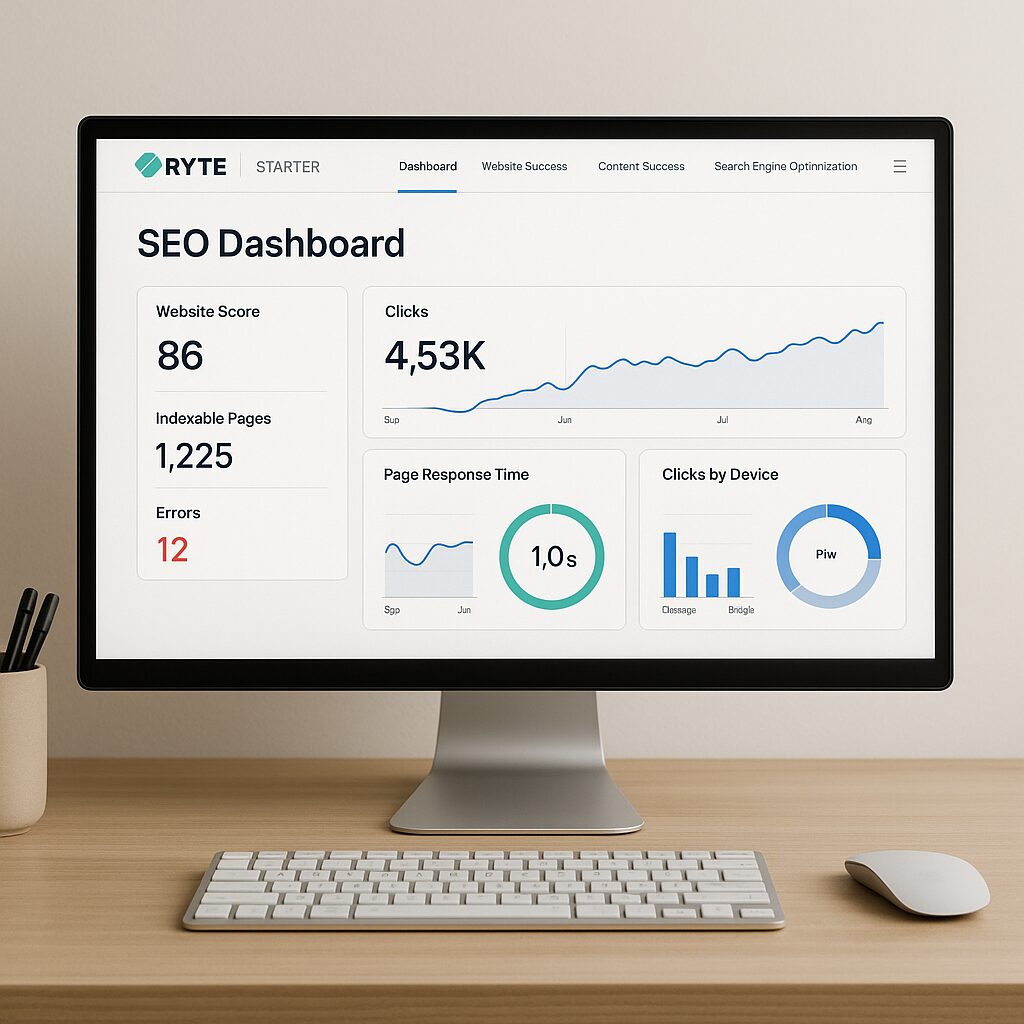
The dashboard is designed to focus on essentials: diagnostics, critical errors, performance alerts. The clear interface avoids visual overload. You get a quick overview of slow pages, broken links, and missing tags. The responsive design makes consultation convenient on mobile or tablet.
Essential features
Ryte Starter includes these modules:
- Technical analysis (site crawl, detection of 4xx and 5xx errors).
- Basic keyword monitoring (positions on a few strategic queries).
- Google Search Console coverage report.
- CSV data export.
These components are sufficient for most showcase sites or blogs, without paying for advanced features sometimes unused.
Prerequisites and initial setup
Before starting, make sure you have:
- A WordPress site or other CMS.
- Administrator access on your domain.
- A Google account, to link Search Console.
Creating a Ryte Starter account
Go to the Ryte Starter registration form, enter your email and a strong password. After validation, you arrive directly on the service’s homepage. Be sure to confirm your address before moving to the next step.
Installing the tracking script
Ryte provides you with a JavaScript snippet to paste into your site’s header. On WordPress, you can do this via your child theme or a plugin dedicated to scripts. The goal is to trigger the daily crawl and track technical evolution.
Step-by-step configuration
Each setting is adjusted from the « Projects » menu of Ryte Starter. Follow this plan:
Set up your first project
In the Projects section, click on « Add ». Give it a clear name, for example « MySite.com », and enter the root URL. Specify if your site uses HTTPS. This simple setting allows you to customize reports and isolate data.
Connect your Google Search Console
From the Integrations tab, select Google Search Console: an OAuth link appears to authorize access. Once validated, Ryte Starter automatically imports impression, click, and ranking data. You get a quick overview of your presence in Google results.
Adjust SEO settings
Ryte Starter offers options to:
- Exclude certain sections from crawling (private directories, URL parameters).
- Set the scan frequency.
- Enable email notifications for each new alert.
These fine settings ensure that reports remain relevant and free from unnecessary noise.
Use reports and optimize your site
The collected data turns into concrete actions. The goal: improve speed, fix errors, and optimize content.
Performance analysis
The performance module lists pages whose loading time exceeds a threshold. You often discover unoptimized images or overly heavy third-party scripts. By relying on these reports, you significantly reduce loading time and improve user experience.
For readability and content quality, also consider using free readability analysis tools that perfectly complement the technical view of Ryte Starter.
Monitoring technical health
Daily monitoring immediately flags 404 errors and redirect loops. Rather than manually digging through your logs, you receive a concise summary. You can thus prioritize fixing issues that penalize SEO.
Comparison with other lightweight SEO tools
Ryte Starter does not aim to replace comprehensive suites like Semrush or Ahrefs, but to offer a compromise:
| Tool | Strengths | Limitations |
|---|---|---|
| Ryte Starter | Quick installation, clear interface | No advanced backlink tracking |
| Ubersuggest | Keyword suggestions, audits | Sometimes overloaded interface |
| Linkuma | Backlink analysis | Steeper learning curve |
For a detailed comparison of alternatives to Ubersuggest, see our article on key features of Ubersuggest and its main alternatives.
By optionally adding a Trust Flow analysis tool, you get a comprehensive overview of your SEO. Discover some of these solutions in our guide to essential tools to analyze and increase your Trust Flow.
FAQ
- How to update Ryte Starter and receive new features?
- Ryte Starter updates automatically via the tracking script. For major new features, you receive an email alert or a notification in the dashboard.
- Can I exclude certain URLs from the crawl?
- Yes, in the project settings, you define exclusion filters based on URL patterns or directories.
- Does Ryte Starter offer a content audit?
- The main focus remains technical, but the GSC module provides keyword performance and impression indicators.
- How many projects can I manage with Ryte Starter?
- The basic plan allows up to 5 domains. For more, a premium offer is available.
- Which browsers are supported?
- Ryte Starter works on Chrome, Firefox, Safari, and Edge, without the need to install an extension.
- Can data be exported?
- Yes, each report can be downloaded in CSV format for external processing.
- Is a specific hosting required?
- No, Ryte Starter works on all standard hosting, without server configuration constraints.
