
| Key Points | Details to Remember |
|---|---|
| 📧 Subject Definition | Identify the symptoms of a blocked email on Bbox |
| ⚙️ Main Benefits | Restore the smooth exchange of messages |
| 🛠️ Associated Methods | Apply standard SMTP/IMAP settings |
| 📋 Practical Tools | Use Bouygues’ online diagnostics |
| 🎯 Expected Results | Accelerate resolution with an action plan |
| 🔒 Security and Access | Verify authentication and SSL configuration |
Are you experiencing errors when sending or receiving your emails on Bbox Mail? In just a few minutes, you will understand where these blockages come from and how to fix them step by step. This guide answers the most common questions with concrete solutions.
Somaire
Why Sending and Receiving Issues Occur on Bbox Mail
Malfunctions often appear following a security update, a password change, or a misconfiguration of your mail client. Understanding the causes helps quickly target the source of the problem.
- Protocol evolution (forced switch to TLS 1.2 or 1.3).
- Blocking by antivirus or local firewall.
- Incorrect entry of SMTP ports (465/587) or IMAP (993).
- Automatic password update not reflected.
- Mailbox quota exceeded causing reception refusals.
Frequently Asked Questions and Step-by-Step Solutions
Why can’t I send emails from Bbox Mail?
A sending error may manifest as messages stuck in the outbox or SMTP codes 421, 450. These often reveal:
- A blocked port: check the use of port 587 with STARTTLS or 465 with SSL/TLS.
- An incorrectly entered username: the field must contain the full address.
- An overly restrictive firewall: allow your mail client to access the Internet.
To test immediately, switch to a webmail (webmail.bbox.fr). If sending works online, the cause is local: client, antivirus, network.
Why am I not receiving my emails on Bbox Mail?
Reception usually blocks at the IMAP level (error codes 64xx or 10060). Key points:
- Full mailbox quota: delete or archive elsewhere.
- Incorrect IMAP configuration: port 993 with SSL/TLS required.
- Overly aggressive antispam: temporarily disable protection and try resynchronizing.
If in doubt, enable the diagnostic mode integrated in your software or check the connection log to detect IMAP refusals.
What to do in case of error 550 or 554 on Bbox Mail?
These codes indicate that the server has rejected the message, often due to authentication or sender reputation issues.
- Check the password and username.
- Make sure your address is on the whitelist of your own domain.
- Test the email via another network (4G, public Wi-Fi) to rule out an IP block.
If the problem persists, request an unblock through Bouygues Telecom support by providing the full message header.
How to configure Bbox Mail on a common email client?
Whether it is Outlook, Thunderbird, or Mail on macOS, the settings remain standardized:
| Parameter | Value |
|---|---|
| Incoming server (IMAP) | imap.bbox.fr |
| IMAP port | 993 (SSL/TLS) |
| Outgoing server (SMTP) | smtp.bbox.fr |
| SMTP port | 465 (SSL/TLS) or 587 (STARTTLS) |
| Authentication | Username: your full address + password |
After entering, send a test email to yourself. The absence of an error confirms that the settings have been correctly applied.
How to resolve an authentication problem on Bbox Mail?
Access denial may result from a recent password change or two-factor authentication enabled on your Bbox account.
- Re-enter your password on each device.
- If SSO (single sign-on) is enabled, generate an application-specific password.
- Delete and then recreate the account in your client; sometimes resynchronization resolves the conflict.
Tools and best practices to avoid malfunctions
Adopting some preventive habits makes all the difference:
- Regularly update your email software and antivirus.
- Check the Bbox storage quota before any heavy operation.
- Consult protocol migration alerts in your client area.
- Use a lightweight VPN if you often switch public networks.
- Enable two-factor authentication or an application password.
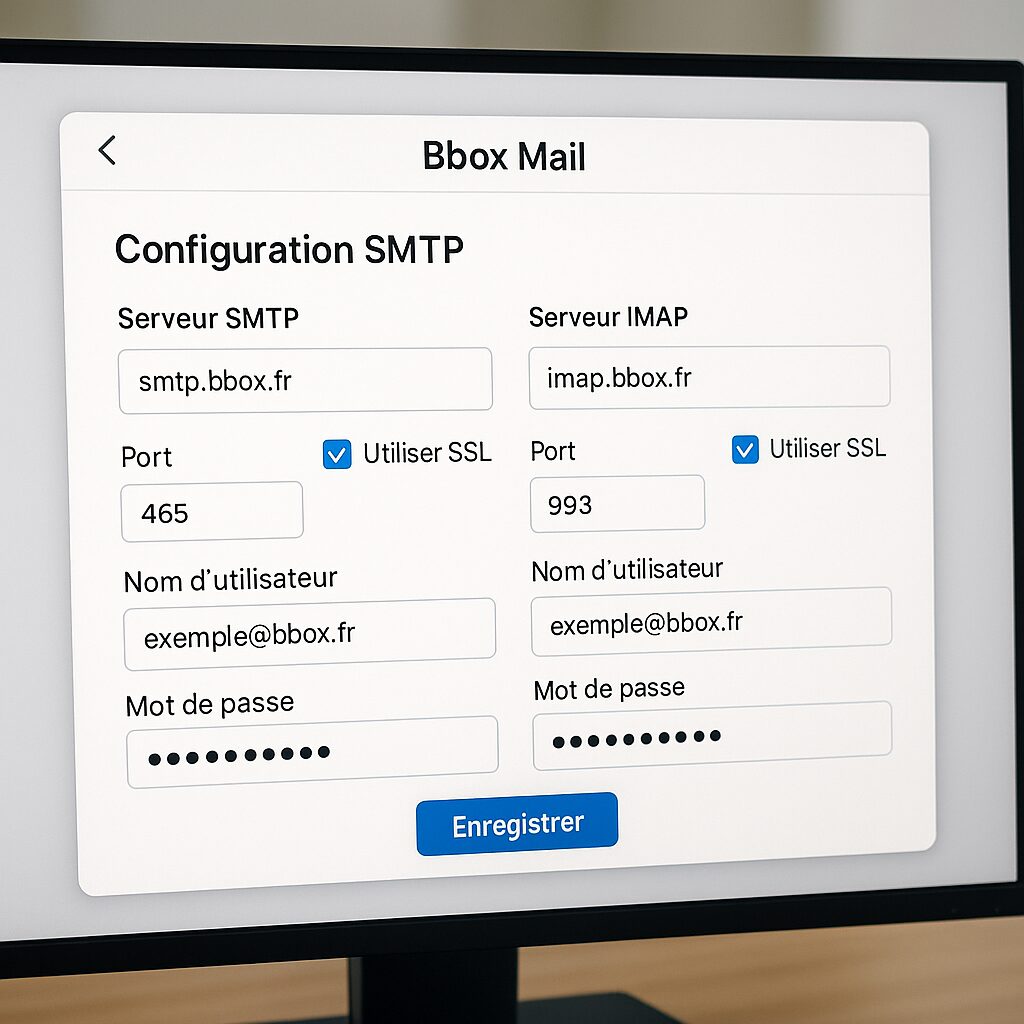
The illustration above shows the configuration screen on a desktop client, with a clear distinction between SSL and STARTTLS.
The essentials
- Immediately identify the error code and target SMTP or IMAP.
- Follow the ports and protocols recommended by Bouygues Telecom.
- Free up space before considering a full reset.
- Keep your password up to date on all your devices.
- Use webmail to quickly diagnose if the issue is local.
FAQ
- How do I access Bbox webmail to test my sends?
- Log in at webmail.bbox.fr with your Bbox credentials. If sending works, the problem is with your local client.
- What is the typical delay for new SMTP settings to take effect?
- Bouygues servers update settings instantly. Reconnect your client within a minute to verify.
- Can I use another SMTP address to bypass a block?
- Theoretically yes, but this can trigger spam alerts. It is better to unblock the original configuration.
- Is there a maximum quota limit for Bbox Mail?
- The limit is generally 5 GB. You receive a notification at 90% usage.
- How do I get an application password on Bbox Mail?
- Go to your client area, “Security” section, then generate a password for third-party applications.
