

| Key Points | Details to Remember |
|---|---|
| 📦 Definition | Scraping covers to organize your collection |
| 🛠️ Main Tools | Universal XML Scraper, Skraper, OpenScraper, PyGameDB, ScreenData |
| ⚙️ Operation | TheGameDB API for queries and metadata |
| 📊 Methods | Automation, scheduling and sorting by platform |
| 🖼️ Results | Quality of image, resolution, and consistent naming |
| 🔒 Management | Quota and API limits respected |
| 🤖 Automation | Regular updates via scripts or Scheduled Tasks |
With just a few clicks, these scrapers leverage TheGameDB API to download, name, and organize your video game covers. This article breaks down five essential tools, details their installation, strengths, and offers tips to optimize your visual library.
Somaire
Selection Criteria for the Best Scrapers
To establish this comparison, I selected five key criteria that ensure reliable collection and smooth organization of visuals:
- Compatibility with TheGameDB API and respect of quotas
- User interface or command line scripting capability
- Support for formats (PNG, JPG) and HD resolutions
- Automatic sorting options (platform, region, edition)
- Updates and maintenance by the community
Detailed Comparison of the Tools
Each solution offers a compromise between ease of use and flexibility. Here is a commented overview.
Universal XML Scraper
Originally designed for Kodi, Universal XML Scraper is a classic. It combines a graphical interface and batch processing scripts.
- Windows/Mac/Linux installation via ZIP archive
- Search by title or ID, bulk extraction
- Customizable renaming templates
- Support for multiple databases: TheGameDB, IGDB, Giant Bomb
- Active community, regular updates
“The strength of Universal XML Scraper lies in its versatility: one tool to crawl multiple databases.”
Skraper
Skraper focuses on user experience thanks to its intuitive interface and configuration panels.
- Interface organized by column: input, preview, settings
- Automatic detection of the games folder
- Advanced filters (region, collector’s edition)
- Import/Export projects in JSON format
Its ergonomics facilitate targeted scraping campaigns without using the console.
OpenScraper (Python script)
OpenScraper is an open-source script written in Python, ideal for terminal enthusiasts.
- Quick installation via pip
- Launch via command line: customizable flags
- Detailed logs and CSV report after extraction
- Extensible via plugins for other sources
For developers, modularity allows easy addition of export functions to personal databases.
PyGameDB
PyGameDB combines an object-oriented Python client and a CLI plugin, focused on TheGameDB’s official API.
- Native authentication management
- get_covers(game_id) function to retrieve only visuals
- Cache options to limit network calls
- Script examples provided in the Git repository
The advantage of PyGameDB? Easily integrable code into your own automation tools.
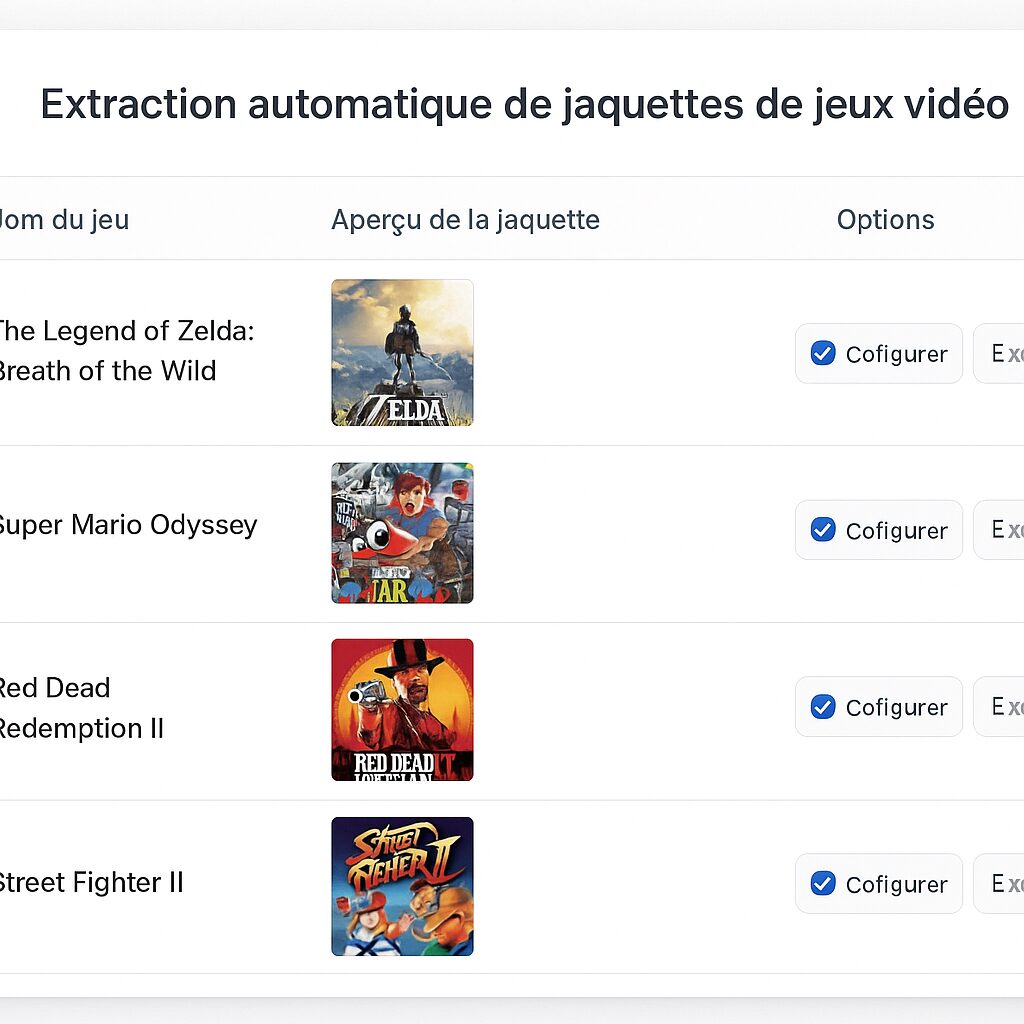
ScreenData
ScreenData focuses on speed and robustness. Designed in Go, it promises lightning-fast executions.
- Single binary, no external dependencies
- Multithreading to launch multiple requests simultaneously
- Output in ready-to-use tree structure (platform/game/cover.png)
- Automatic HTTP error handling and delay compliance
Perfect for handling massive libraries without sacrificing stability.
Quick installation and configuration guide
Whether you are on Windows, macOS, or Linux, these steps ensure a flawless setup:
- Download the binary or clone the tool’s Git repository
- Create an API key on your TheGameDB account
- Place the key in a configuration file (e.g. scraper.conf)
- Run a test command to verify the connection
- Set an output directory for your covers
In a few commands, you configure a complete and reliable scraping, ready to run as a scheduled task.
Best practices and optimization
To gain efficiency and avoid blocks, here are three proven tips:
- Enable local cache to limit calls and reduce latency
- Distinguish covers by resolution: HD, SD, 2K… according to your needs
- Plan a post-scraping process to rename and group files
These fine settings guarantee a cover library that is always consistent and up to date.
FAQ
- What is TheGameDB and why use it?
- TheGameDB is a community database of metadata and visuals for video games. It is chosen for its richness, open API, and permissive license.
- How to avoid exceeding the API quota?
- Enable caching, limit the number of simultaneous requests, and add a delay between each call to spread the load.
- Which scraper is easiest for a beginner?
- Skraper, thanks to its visual interface, guides you step-by-step without touching the command line.
- Can I automate scraping new covers?
- Yes, by scheduling a cron job (Linux) or a scheduled task (Windows) that reruns your script daily.
- How to integrate covers into an existing catalog?
- Use the renaming templates and folder structures offered by each tool so they automatically align within your library manager.
