

| Key points | Details to remember |
|---|---|
| 🚦 Definition | Interception and redirection of application traffic on Windows |
| ⚙️ Features | Advanced rules, profile management and monitoring |
| 🚀 Performance | Low latency and controlled network consumption |
| 🔒 Security | Encryption of traffic and advanced authentication |
| 💸 Pricing | Limited free version versus paid pro license |
| 🤝 Compatibility | Windows 7 to 11, 32/64 bits |
At the heart of Windows environments, Proxifier reigns supreme for directing your applications’ traffic to a proxy server. Yet, at a time when every millisecond of connection and every byte counts, several alternatives have emerged. This article dissects Proxifier and then reviews the most convincing challengers, offering a detailed guide to help you choose based on your budget, security needs, and tolerance for manual configuration.
Somaire
Why choose a proxy tool on Windows ?
One might think that Windows natively integrates all mechanisms to manage proxies, but most applications do not obey system settings. A third-party utility slips between the application and the network, capturing packets to redirect them without touching the Windows registry. In practice, this means total freedom: deciding that a browser uses an HTTP proxy, that an email client uses an encrypted SOCKS5, while the rest of the traffic goes directly. Cherry on top, you can define granular rules based on the executable name, IP address, or destination port.
Proxifier: the flagship tool to redirect your traffic
Installation and getting started
Downloading Proxifier from the official site is a single executable of about twenty megabytes. After installation, a first window invites you to create a proxy profile: you choose between SOCKS4, SOCKS5, HTTPS, or an SSH tunnel. The interface consists of three panes: the list of rules, the detailed connection log, and the real-time graphical view. A few clicks later, your favorite application is configured without touching its internal options. In less than five minutes, a novice can achieve an instant restart of their connections via the proxy.
Key Features
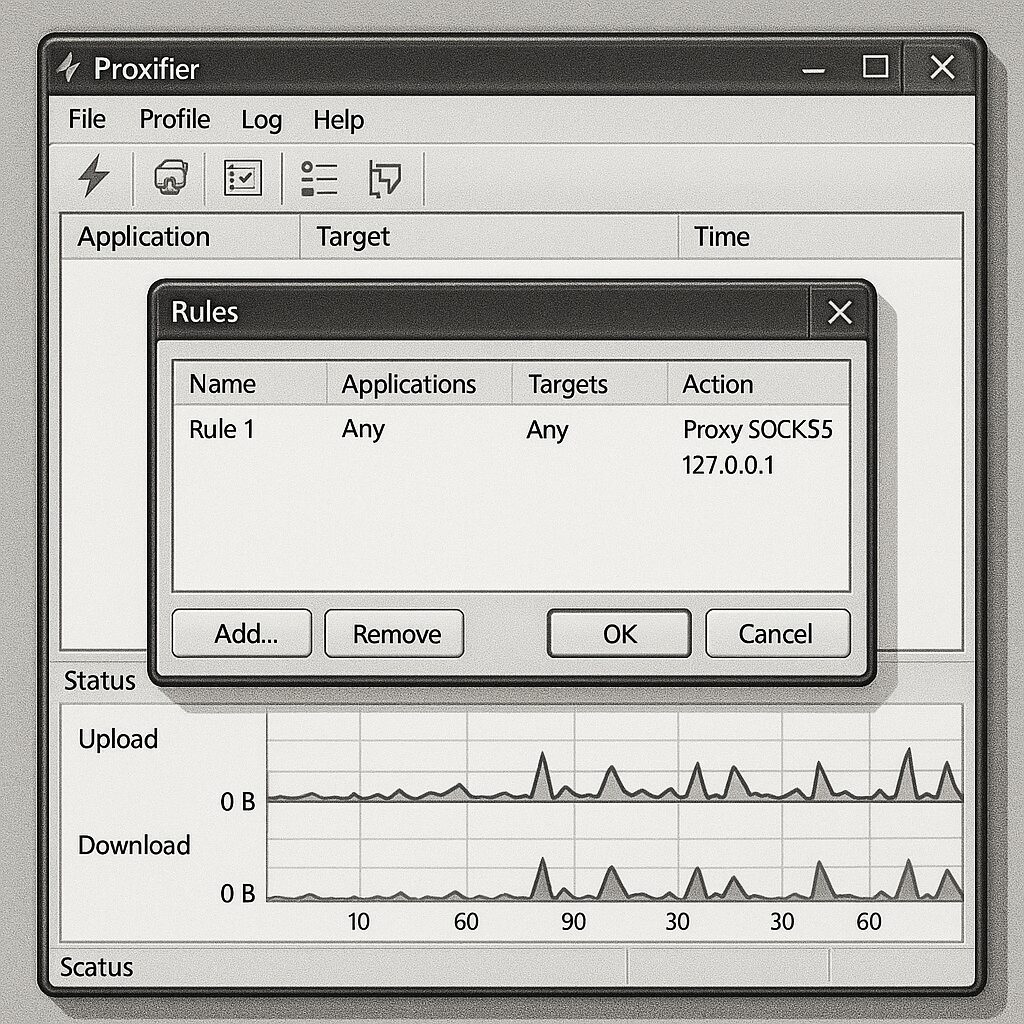
Proxifier has refined its offering around several pillars:
- Redirection rules: sorting traffic by application, by port, or by subnet.
- Multiple profiles: quick switching between different servers or configurations depending on location.
- Encryption via SSH or HTTPS tunnels to mask the nature of the traffic.
- Live monitoring: exportable graphs and logs to analyze latency and throughput.
- Scripting: integration of external commands to automate rule creation or proxy activation/deactivation.
Weaknesses to Consider
Although effective, Proxifier shows some limitations for intensive use or in corporate environments. The annual license model can weigh on a tight budget. The lack of native OAuth or LDAP authentication requires workarounds. Finally, the documentation, mostly in English, requires some technical familiarity to exploit the available scripts and APIs, which can deter less experienced users.
Comparison of the Best Alternatives to Proxifier
Several tools challenge Proxifier, each showcasing its own strengths: open source, free, or equipped with a cleaner interface. The choice often comes down to ease of installation, depth of settings, and overall cost.
ProxyCap: Flexibility and Integration
ProxyCap is based on a philosophy similar to Proxifier, with a less cluttered UX and a slightly more visual rules system. You draw “sources” and “destinations” on a canvas, associating each application with an HTTP, SOCKS, or SSH proxy. Windows integration is polished: background service management, automatic startup, and system notifications. The 30-day trial reveals the essentials; the individual license remains affordable. On the security side, ProxyCap offers password or SSH key authentication but does not include encryption by default, unlike Proxifier.
SocksCap64: Simple and Fast Open-Source
A modern fork of the old FreeCap, SocksCap64 bets on lightness. Direct download, ZIP file. No installer pollutes your system: unzip, launch, set a SOCKS5 proxy in three fields. For each application, you check the “Proxy” box in its list. The tool does not handle HTTPS or SSH tunnels, but for basic use it is more than sufficient. Its streamlined interface hides a robust engine capable of running without administrator rights, a plus in sensitive environments.
WideCap: Flexibility and Complementary Modules
Less known but well-designed, WideCap stands out with its plugin system. Beyond the classic SOCKS and HTTP, you can install modules for OpenVPN, Tor, or even residential proxies. Administration is done via a plugin manager: you add or remove functionalities on the fly. WideCap comes by default with a rules file inspired by patterns from web browsers and mail clients, saving time. For monitoring, it is a bit more austere: no graphs, but a real-time viewable log stream.
Feature Comparison Table
| Feature | Proxifier | ProxyCap | SocksCap64 | WideCap |
|---|---|---|---|---|
| SOCKS5/4 | ✔ | ✔ | ✔ | ✔ |
| HTTP(S) Proxy | ✔ | ✔ | ✘ | ✔ |
| SSH Tunnel | ✔ | ✔ | ✘ | ✔ (plugin) |
| Encryption | Built-in | SSH only | No | Via plugins |
| Graphical Monitoring | ✔ | ✔ | ✘ | Raw logs |
| Free Version | No (31-day trial) | 30-day trial | Yes | Yes |
| License | Paid license | Paid license | Open source | Free |
Choose According to Your Needs: Buying Guide
The decision is based on three main factors:
- Budget: if cost is the priority, SocksCap64 or WideCap are the obvious choices; for professional use, Proxifier or ProxyCap are worth their price.
- Security: Proxifier and ProxyCap provide native encryption and access control; WideCap requires modules.
- Simplicity: SocksCap64 focuses on the essentials, ProxyCap offers a more intuitive interface, Proxifier is somewhere in between.
Finally, if you plan to combine free proxies and VPNs, keep in mind our investigation on free VPNs in 2025 to assess reliability risks and associated performance.
FAQ
- What is an application proxy?
- An application proxy intercepts an application’s traffic before it reaches the network, redirects it to an intermediary server, then relays it to its final destination.
- Is Proxifier compatible with Windows 11?
- Yes, Proxifier supports versions 7, 8, 8.1, 10, and 11, both 32 and 64-bit.
- Can I use multiple profiles simultaneously?
- In Proxifier, you switch manually between profiles. ProxyCap offers hot switching via its system menu.
- Are FreeCap or SocksCap64 safe?
- Since their code is open source, they do not contain bloatware, but they do not include native encryption: you will need to rely on a secure external proxy.
- How to monitor network activity?
- Proxifier and ProxyCap include real-time graphs and exportable logs. WideCap is limited to a raw log.
