
Summary — Melanie2web (often “Messagerie Mél”) is the secure webmail used by several French ministries. This guide covers the definition, eligibility, access via Cerbère, official links, useful features, security, and a troubleshooting FAQ. The information below is based on government sources and ministry information pages.
Author: Gallica Web Team (systems administration / Ubuntu, web integration). Review: security & operations division. Publication: 2025-08-06 • Updates: as official announcements are made (log at the bottom of the page).
Somaire
1) What is Melanie2web?
Melanie2web, often called “Messagerie Mél,” is the web interface that provides access to the professional email of a group of ministries within a unified environment managed by the State. The goal is not to compete with public services but to offer a secure, interoperable, and sustainable gateway for daily exchanges of agents, with centralized management of identities and rights. This email system is part of the trajectory of the State Collaborative Messaging (MCE), a strategy presented in BlueHats workshops that emphasizes an open-source foundation, sovereignty, and cost control, while improving the experience through an integrated collaborative suite.
2) Who can access it?
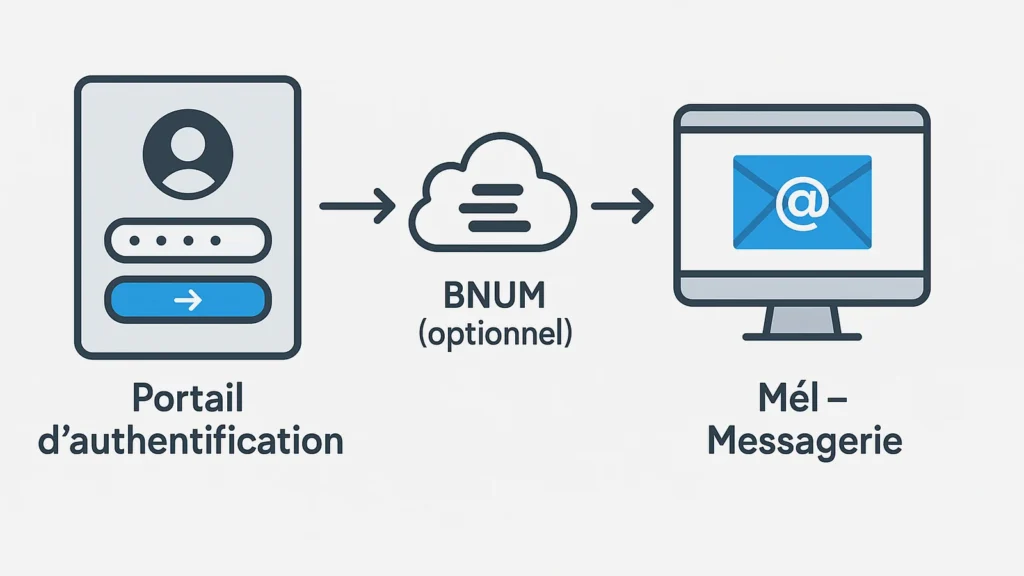
Access to Melanie2web is reserved for authorized personnel of the concerned ministries and their services, in both central and decentralized administrations. Accounts are provided and managed by the ministries’ IT departments; they can be associated with personal mailboxes as well as role-based or shared mailboxes depending on the organization. Authentication is federated via Cerbère, allowing the use of the same identifier for multiple professional applications within a compartmentalized and auditable perimeter. For the end user, the convenient entry point is the Digital Office (BNUM), which aggregates email, calendars, chats, and other useful components to reduce usage friction and unify the work routine.
3) Access & login via Cerbère (Official URLs)
The standard process takes place in four steps: open the Mél webmail page, be redirected to the Cerbère authentication portal, enter credentials (and, when required, enhanced authentication or VPN access), then automatically return to the mailbox. This architecture strengthens security without multiplying passwords and ensures homogeneous account management. In many cases, it is also possible to enter via BNUM, which acts as a single access gateway to daily tools. Special cases exist for certain agents (e.g., agricultural sector), with dedicated portals indicated directly on the Cerbère login page.
3.1 Useful links (to add to your favorites)
- “Mél” Webmail: mel.din.developpement-durable.gouv.fr
- Cerbère Portal (CAS): authentification.din.developpement-durable.gouv.fr
- BNUM (Digital Office): bnum.din.gouv.fr
3.2 Login steps
- Open the Mél webmail (or BNUM) in an up-to-date browser (JavaScript enabled).
- Enter your credentials on Cerbère and validate (first connection: creation/terms of use if necessary).
- Access your personal mailbox and, depending on rights, shared mailboxes/resources.

4) Useful daily features
Melanie2web offers the expected uses of a modern webmail: composing and receiving messages, quick search, server-side folder and filter management, ministerial address book, and access delegation for shared mailboxes. Integration into the work ecosystem via BNUM allows gathering messaging, calendars, and instant exchanges behind a unique identity, with centralized rights management. In practice, this coherence improves business continuity, standardizes collaboration between teams, and limits the dispersion of links and accounts, while laying technical foundations compatible with the security and traceability requirements specific to State information systems.
5) Security, compliance, and best practices
The system relies on a centralized authentication chain, encrypted communications, harmonized access policies, and management by the State’s digital sector. External access may require a VPN or strengthened authentication depending on the sensitivity of applications and the ministerial context. Regarding digital hygiene, some habits are essential: keep the workstation updated, enable strong authentication when offered, verify official URLs before entering credentials, limit the sharing of sensitive attachments to the strict necessary, and respect archiving rules. For any uncertainty, refer to the instructions and guides provided by the attached IT department.
6) Troubleshooting: common cases
Forgot password / account locked
Use the dedicated functions on the Cerbère portal (unlock or reset), then retry connecting to the webmail. In case of repeated failure, contact the ministerial support with the timestamp, browser, and URL used.Already connected to Cerbère, but Mél does not open
After successful authentication, open the Mél webmail address in the same browser (favorites/BNUM). If needed, clear the cache and verify that JavaScript is enabled.External access impossible
Some perimeters require a prior connection (VPN/2FA) before reaching internal applications. Check your ministry’s policy and try again after connecting to the expected network.Missing shared mailboxes
Request the IT department to verify/assign rights on the role mailbox. Additions take effect after propagation; a session restart may be necessary.Special cases (Agriculture, outside DDT(M))
The Cerbère portal mentions the use of another entry point (EAP) for certain profiles. Follow the instructions of the concerned IT department.
7) Detailed FAQ
Are Melanie2web and Cerbère the same thing?
No. Melanie2web is the messaging (webmail). Cerbère is the common authentication portal that connects you to several applications (Mél, BNUM, etc.). What is the official URL of the Mél webmail?
The reference provided by ministerial pages points to mel.din.developpement-durable.gouv.fr. Add it to your favorites and always prioritize .gouv.fr domains. What is BNUM used for?
BNUM centralizes access to the main business tools: messaging, calendars, discussions, etc. It simplifies the routine, limits the scattering of links, and relies on Cerbère authentication. Which browsers and settings are recommended?
Use a modern up-to-date browser, allow JavaScript on authentication portals, and follow security guidelines (certificates, session locking, updates).
8) Official links & resources
- BNUM – Digital Office (unified access, “Log in with Cerbère” button).
- Cerbère Authentication Portal (CAS login page & notices).
- Sheet “First connection / create a Cerbère account” (PDF).
- Mél Messaging – ministry/ChloroFil page (Mél webmail URL).
- BlueHats – Presentation of the State Collaborative Messaging (MCE) and webinar.
- Note “Why bnum.din.gouv.fr” (context and objectives).
9) Change log
- 2025-08-06: initial publication, addition of security, troubleshooting, FAQ, and JSON-LD sections.
Written and proofread by Gallica Web. This document does not constitute an official note and refers to the official government reference resources.
