

| Key Points | Details to Remember |
|---|---|
| 📧 Protocol Definitions | IMAP synchronizes your messages across all your devices; POP downloads them locally. |
| ⚙️ Operation | IMAP keeps each email on the server; POP generally deletes the message after downloading. |
| 🔒 Security | IMAP favors SSL/TLS for encrypted transport; POP can expose your emails if misconfigured. |
| 💻 Configuration | Ports and IMAP/POP servers differ, remember to adjust settings according to your client. |
| ✅ Best Practices | IMAP ideal for multiple devices; POP for standalone local archiving. |
| 📈 Performance | IMAP uses more bandwidth, POP frees the server after each download. |
IMAP and POP remain the two pillars for retrieving your emails on Bbox Mail: IMAP offers real-time synchronization, while POP favors local storage and offline archiving. Choosing one or the other depends on your usage (multiple devices or single), your bandwidth constraints, and security.
Somaire
Understanding IMAP and POP Protocols
To make an informed decision, it is essential to grasp the fundamental mechanisms behind these two protocols.
The IMAP Protocol in Practice
IMAP (Internet Message Access Protocol) keeps all your messages on the server. Each action — reading, moving, deleting — is immediately reflected across all connected clients. This way, you find the exact state of your mailbox from a smartphone, tablet, or webmail.
- Advantage: unified access and history always available.
- Disadvantage: higher server load and data consumption.
The POP Protocol in Practice
POP (Post Office Protocol), generally version 3, downloads your emails to the device, then, depending on configuration, deletes them from the server. You then only access a local copy and depend on your backups to restore a message.
- Advantage: saves server resources and offline access.
- Disadvantage: no synchronization between multiple devices.
IMAP vs POP for Bbox Mail: Selection Criteria
Your choice should be based on access frequency, number of devices, and data retention.
Multiple Devices and Synchronization
If you check your email from a computer, smartphone, and webmail, IMAP is inevitable. Each action is reflected everywhere. POP, on the other hand, is suitable for single use, such as a dedicated work computer.
Local storage and management
For secure local archiving — permanent offline or in an encrypted vault — POP simplifies management. You retain full control of downloaded messages and limit the clutter on the Orange server.
Security and encryption
Both IMAP and POP can operate with SSL/TLS. Be sure to enable encryption from the configuration stage to avoid interception of your credentials and content.
Bbox Mail step-by-step configuration
Here are the settings to enter in your client for each protocol.
IMAP settings
| Field | Value |
|---|---|
| Incoming server (IMAP) | imap.mailbbox.fr |
| Port | 993 (SSL/TLS) |
| Outgoing server (SMTP) | smtp.mailbbox.fr |
| SMTP port | 465 (SSL/TLS) or 587 (STARTTLS) |
| Authentication | Bbox Mail username and password |
POP settings
| Field | Value |
|---|---|
| Incoming server (POP3) | pop.mailbbox.fr |
| Port | 995 (SSL/TLS) |
| Outgoing server (SMTP) | smtp.mailbbox.fr |
| SMTP port | 465 (SSL/TLS) or 587 (STARTTLS) |
| Authentication | Bbox Mail credentials |
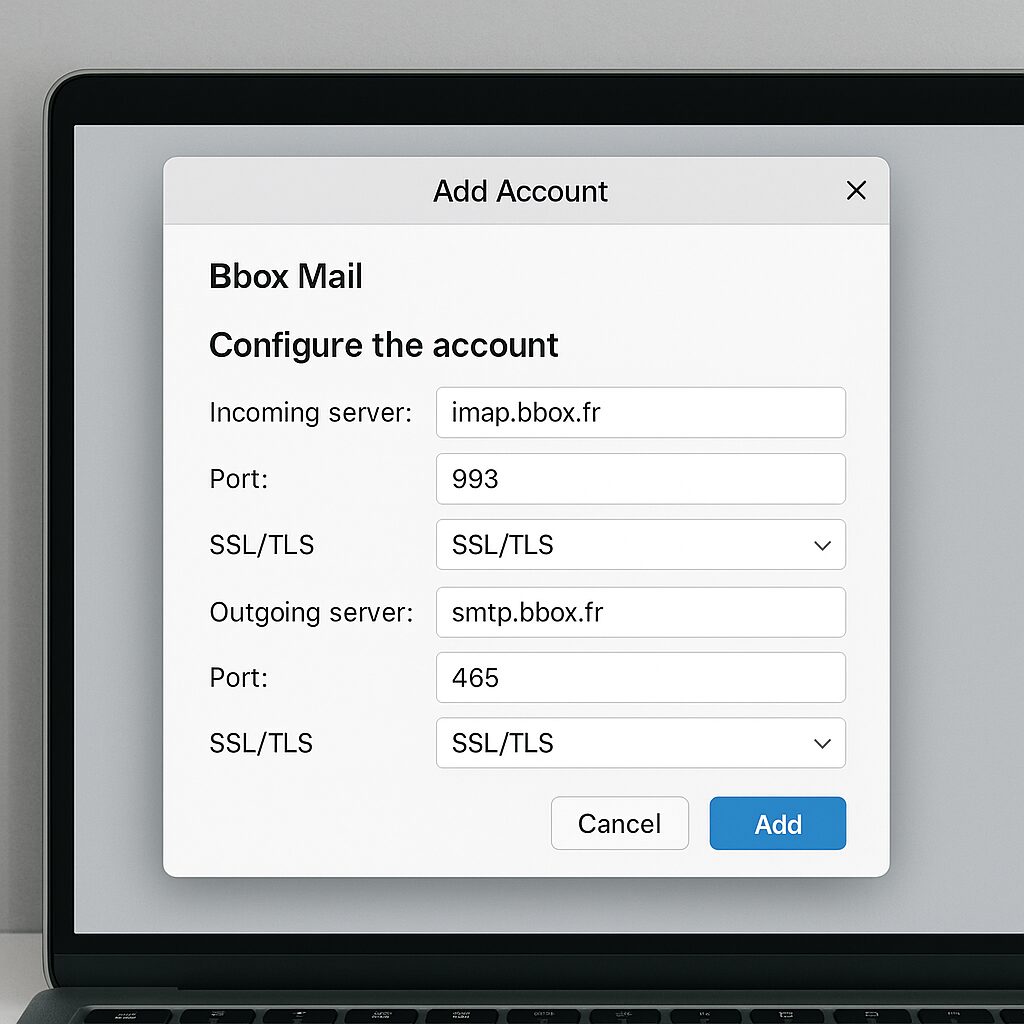
Example configuration on Outlook and Gmail
For detailed setup on different clients, you can consult our dedicated tutorial on how to configure your Bbox Mail on Outlook and Gmail. It describes each step and provides screenshots for error-free settings.
Best practices and recommendations
Adopt these habits to ensure optimal use of your email service.
- Always enable encryption SSL/TLS for IMAP and POP.
- Regularly back up your emails if you use POP.
- Check the capacity of your Bbox Mail space to avoid any blockage.
- Update your email client and operating system.
- Clean the Spam and Trash folders to free up space.
FAQ
- 1. Which protocol to choose for use on smartphone and PC?
- IMAP is recommended because it synchronizes actions (reading, deletion) across all your devices.
- 2. Can a local copy be kept with IMAP?
- Yes, by configuring your client to keep a local archive, you can access messages offline.
- 3. How to recover deleted emails after a POP transfer?
- Without prior backup, it is impossible to recover messages deleted from the server, hence the importance of enabling the “Leave a copy on the server” option.
- 4. Which ports should be used to ensure security?
- For IMAP, port 993 (SSL/TLS); for POP3, port 995 (SSL/TLS); for SMTP, port 465 (SSL) or 587 (STARTTLS).
- 5. Should IMAP be preferred if server space is limited?
- No: POP allows automatic freeing of the mailbox by downloading and deleting messages.
- 6. How to switch from POP to IMAP without losing old emails?
- Configure IMAP in parallel, then manually move local folders to the server via your client.
